
⚠️ Affiliate Disclosure: This post is not an affiliate associated review. It may become one in the future and this disclosure will reflect that. This does not affect my reviews and I only recommend tools I genuinely believe in.
This Suno review covers the AI music generator that lets anyone create full songs from a text prompt — no musical knowledge required. We tested it extensively to give you a clear picture of what it can and can’t produce.
Update, September 2026: Suno has launched its v6 model suite — the first built on its licensing deals with Warner Music Group, BMG and Believe, trained on licensed catalogues with revenue sharing for artists. Three tiers: v6 and v6-wild for Pro and Premier subscribers, and v6-mini for everyone, including the free plan. Suno says previous models will be retired as v6 rolls out. Lawsuits from Universal and Sony remain unresolved. We will retest on v6 and update this review’s scores if the verdict changes. Retested, 11 September: we ran v6 through the same lyrics and style brief as our original test. The production has clearly been ramped up — the vocal is far more melodic, with a real melody built around the singer’s voice, and the overall polish is now much closer to Nafy AI’s vocal standard. One honest observation: the result leans chart-pop rather than the nightclub EDM the brief asked for — a mild drift, at much higher quality. And this time the evidence below is a direct download, no microphone required.
Suno Review
Suno turns a text description into a complete song — vocals, melody, lyrics, and instruments — in under 30 seconds. No music knowledge required. You type “upbeat indie pop song about missing a train”, and Suno generates two fully produced tracks with sung lyrics. Our Suno review will help to explain what it actually sounds like, how the pricing works, and who should use it.
What is Suno?
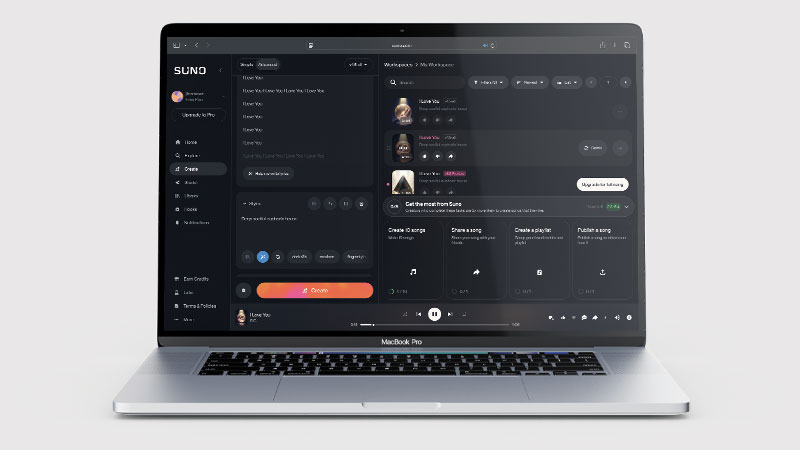
Suno is an AI music generation platform that creates complete songs from text prompts. Unlike tools that generate background loops or ambient music, Suno produces tracks with actual sung vocals, written lyrics, full instrumentation, and production — more like a fully recorded song than a beat or backing track.
The current model is Suno V5 (2026), which produces significantly more coherent and expressive tracks than earlier versions. It supports 100+ genres — from lo-fi hip hop to country ballads to death metal — and generates two song variations per prompt so you can compare and choose the better take.
What Can You Do With Suno?
The simplest use is typing a description and getting a song back. But Suno also has a Custom Mode that lets you write your own lyrics and use structured tags to control the song’s structure — [verse], [chorus], [bridge] — giving you meaningful control over what gets sung and when. The AI handles the melody and production while you supply the words.
Hum-to-Song is one of Suno’s more distinctive features: hum or sing a rough melody into your phone, and Suno builds a full produced track around it. For anyone with melodic ideas but no way to play or record them properly, this is genuinely useful. On Premier plans, stem splitting separates your finished track into individual audio components — vocals, drums, bass, melody — which you can then use in DAWs or remix projects. Suno also integrates with Zapier and Make.com for automating music creation at scale.
Suno Pricing
| Plan | Price/month | Credits/day | Key features |
|---|---|---|---|
| Free | $0 | 50 (non-commercial) | MP3 only, non-commercial use, watermarked metadata |
| Pro | $10 | ~83 (2,500/month) | Commercial rights, WAV quality, priority generation |
| Premier | $30 | ~333 (10,000/month) | WAV + stems, API access, highest priority |
| Enterprise | Custom | Unlimited | Dedicated support, custom integrations, SLA |
The free plan’s 50 daily credits reset each day, making it generously usable for personal experimentation. At ~8 credits per full song, that’s roughly 6 songs per day at no cost — but with non-commercial restrictions, meaning you can’t use the output in monetised YouTube videos, commercial projects, or client work. Pro at $10/month is the minimum tier for any commercial use. Check Suno’s website for current pricing — plans are updated regularly.
Suno Review: Pros and Cons
Suno Pros
- Complete songs with vocals and lyrics in under 30 seconds
- 100+ genres — surprisingly broad range
- No music knowledge required to get good results
- Custom Mode for writing your own lyrics and controlling song structure
- Hum-to-Song turns melodic ideas into produced tracks
- Generous free plan — 50 credits/day without a credit card
- Stem splitting on Premier plan for remix and DAW work
- Integrates with Zapier and Make.com
Suno Cons
- Tracks over 2 minutes can lose coherence — use Extend for longer songs
- AI lyrics can be generic or slightly off without Custom Mode
- Purely AI-generated works may not be copyrightable (US Copyright Office ruling)
- No musical notation, MIDI export, or DAW integration beyond stem splitting
- V5 is a significant improvement but still not indistinguishable from human-made music
- Commercial rights only from the $10/month Pro plan
Who Is Suno For?
Suno is a good fit for hobbyist musicians, content creators, podcasters, and video makers who need original background music without paying royalties or hiring composers. If you produce content regularly and want custom tracks tailored to the mood of each piece, Suno delivers that at very low cost. It is less suited to professional musicians or artists who want full creative control over every production element.
Key Use Cases
Creators who need background music without licensing headaches. Stock music libraries charge per-use and require attribution. Suno generates unique tracks on demand for YouTube videos, podcast intros, or social media content — $10/month for commercial rights versus $30+ per track for licensed stock music. The output won’t win a Grammy, but for ambient background music that you own, it’s a strong value proposition.
Songwriters and musicians prototyping ideas. Turning a chord progression or a lyrical idea into a full demo used to require a studio session or a producer. Suno lets you hear a rough version of the idea in 30 seconds, iterate on it 20 times, and develop the best version further. The Hum-to-Song feature is particularly useful here for melodic ideas that are hard to communicate any other way.
Marketing teams needing branded audio content. Custom jingles, podcast themes, or brand sound assets that match a specific brief. On Premier, the stems mean you can hand the separate audio components to a human producer for further work — Suno becomes a starting point rather than a finished product.
What Are the Downsides of Suno?
Long tracks lose coherence. Suno generates up to roughly 2 minutes natively. Use the Extend function to continue a song past that point — but the longer a track gets, the more likely the structure wanders or the production quality drops. Five-minute songs are possible but hit or miss.
The copyright question is unresolved. The US Copyright Office has ruled that purely AI-generated works cannot be copyrighted — the human creative input must be “more than de minimis.” Using Custom Mode with your own lyrics and melodic input (via Hum-to-Song) strengthens your claim to copyright; using a simple text prompt and publishing the output as-is is legally grey territory. This matters if you’re planning commercial use or licensing the output.
It’s not a DAW replacement. Suno produces finished WAV files, not editable sessions. There’s no tempo control, no key selection, no MIDI. If you need to change the key for a vocalist or adjust the BPM to match a video cut, you’re working with a bounced audio file outside Suno. Premier’s stem splitting helps, but it’s still a tool for generation, not production.
How Does It Compare to Udio?
Suno and Udio are the two leading AI music generation platforms. Suno tends to produce more structured, conventional songs — clearer verse/chorus formats, more predictable lyrical content. Udio tends toward more experimental and atmospheric output with more stylistic variety on unusual prompts, but is less consistent on standard genre requests. Both are strong; the best approach is to try both free plans with the same prompt and see which output fits your taste.
| Feature | Suno | Udio |
|---|---|---|
| Vocals | ✅ Yes, with AI lyrics | ✅ Yes |
| Custom lyrics | ✅ Custom Mode | ✅ Lyrics input |
| Hum/melody input | ✅ Hum-to-Song | ❌ No |
| Stem splitting | ✅ Premier plan | ✅ Available |
| Free plan | ✅ 50 credits/day | ✅ Available |
| Starting paid price | $10/month | $10/month |
| Best for | Structured songs, conventional genres | Experimental, atmospheric |
Is Suno Good? Our Verdict
Yes — we scored Suno 8/10. It produces finished songs with strong vocals and production from a simple prompt, and stem splitting and Extend give you room to work. Tracks over two minutes can lose coherence, and purely AI-generated work may not be copyrightable.
Suno V5 is the most accessible and polished AI music generation tool available in 2026. The free plan is genuinely generous, Custom Mode gives you real creative control, and the Hum-to-Song feature is something no other tool at this price point offers. The copyright grey area is a real limitation for commercial use — understand it before you publish — but for experimentation, prototyping, and background music production, there’s nothing faster.
Suno Review Rating: 8/10
Best for: Creators needing affordable background music, songwriters prototyping ideas, and marketing teams producing branded audio content without a music budget.
Not ideal for: Anyone who needs final-quality commercial music that is unambiguously theirs to copyright, or who needs DAW-level production control.
Suno Score Breakdown
| Output quality | 8.5/10 | Strong vocals and production; tracks over two minutes can lose coherence |
| Ease of use | 8.5/10 | Type a prompt and get a finished song, with Custom Mode for control |
| Features | 8/10 | Stem splitting, Extend and Personas, but no MIDI, notation or DAW integration |
| Value for money | 7.5/10 | Cheaper entry than most rivals, though downloads need a paid plan |
| Overall score | 8/10 | The most complete AI music tool for people who want finished songs |
Frequently Asked Questions
Is Suno worth it?
For finished songs, yes. Suno is cheaper to start than most rivals and produces complete tracks with strong vocals from a simple prompt. Downloads need a paid plan, and be aware purely AI-generated work may not be copyrightable.
Is Suno free?
Yes — the free plan gives you 50 credits per day (resetting daily, no card required), which generates roughly 6 full songs. The restriction is non-commercial use: you can’t publish the output in monetised content or client work. For commercial rights, the Pro plan starts at $10/month.
Can I copyright music made with Suno?
This is legally unresolved and important. The US Copyright Office’s position is that purely AI-generated works are not copyrightable. If you use Suno’s Custom Mode to write your own lyrics and contribute original melodic input via Hum-to-Song, your human creative contribution may be enough to establish copyright — but this hasn’t been tested in court. For commercial use, consult a lawyer familiar with AI intellectual property law.
What genres does Suno support?
100+ genres — including lo-fi hip hop, country, pop, rock, R&B, jazz, classical, metal, reggae, electronic, folk, and everything in between. Genre prompting is generally reliable; Suno is stronger on conventional, well-defined genres and slightly less consistent on unusual genre combinations or highly specific subgenres.
How long can Suno songs be?
Suno generates tracks up to roughly 2 minutes natively. For longer songs, use the Extend function to continue from the end of a clip — you can build a 4–5 minute track this way, though coherence can drop after the 3-minute mark. For structured songs with a defined verse/chorus arrangement, Custom Mode with [verse]/[chorus] tags produces better longer-form results than a simple text prompt.
Suno vs Udio: which is better?
Neither is definitively better — they have different strengths. Suno is more consistent on conventional genres and has Hum-to-Song, which Udio lacks. Udio tends toward more experimental and stylistically varied output and is often stronger on unusual prompts. Both have free plans — test the same prompt in both and see which output fits your needs. Many creators use both depending on the project.
Suno Alternatives Worth Considering
Did you like our Suno Review? We think Suno is the most polished and accessible AI music generation platform in 2026 — but these alternatives may suit specific needs better:
🎵 Udio
Best for experimental and atmospheric music — Udio produces more stylistically varied output on unusual prompts and is worth testing alongside Suno with the same brief before committing to a paid plan.
🎼 Google MusicFX
Best for free background music without copyright concerns — Google MusicFX generates instrumental music via MusicLM with no vocals. Simpler and more limited than Suno, but completely free and with a cleaner copyright position for ambient background use.
🎙️ Adobe Podcast
Best if your priority is audio quality rather than music generation — Adobe Podcast enhances existing recordings with studio-quality noise reduction and speech clarity, and is part of the Creative Cloud suite. It doesn’t generate music, but for spoken-word content creation it’s the strongest AI audio tool available.
Udio — The closest rival on vocal quality, but downloads are currently disabled following its label settlements. See our Udio review.
Every tool we review is signed up for and tested by hand. See how we test and score.

James is an SEO and content specialist with over 12 years’ experience, and tests AI tools so everyday people don’t have to. WhatAITools.co.uk covers honest, no-jargon reviews to help you find the right tool for your needs.


Leave a Reply