
Looking for the best AI video tools? My best AI video tools guide ranks the video tools I’ve tested by score. AI video tools generate, edit and repurpose video without a production crew. I test text-to-video generators, AI editors and clip tools on real footage and real briefs, covering render quality, watermarks, credit systems and whether the output is good enough to publish.
-
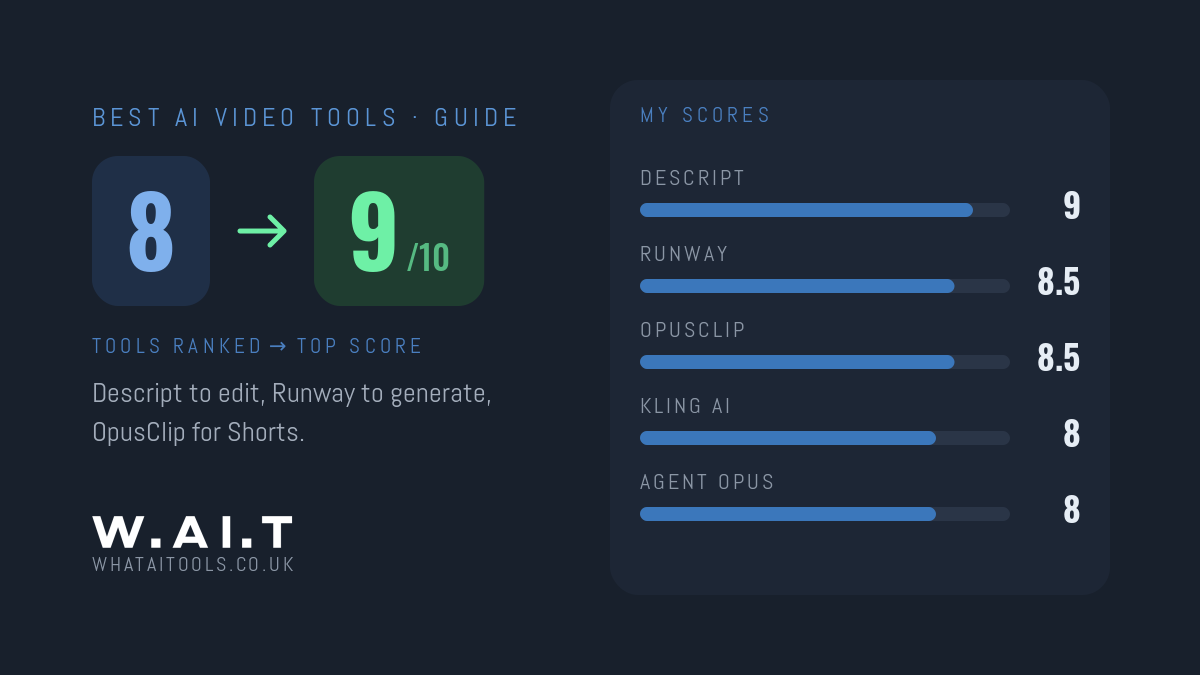
to edit video you’ve filmed, the best AI tool is Descript (9/10). To generate video from a prompt, start with Runway (8.5/10), the most complete AI video studio. To turn long videos into Shorts and Reels, use OpusClip (8.5/10). Kling AI (8/10) is the cheapest way into high-quality generated video.
-
My Dreamina review: ByteDance’s platform runs Seedance, Sora 2 and Veo 3.1 with 225 free tokens a day — the best value in AI video. I scored it 8/10.
-
Agent Opus has launched Audio to Image Video, turning a voice note into an illustrated video of timed stills. The vendor’s claims, how it differs, and what I’ll test.
-
My Pika review: Pikaffects, Pikaswaps and Pikadditions do things no rival offers — but base quality trails Runway and Kling, and free output is 480p. I scored it 7.5/10.
-

The best AI tools for content creators I’ve tested, ranked by my scores: Descript (9/10) for editing, plus Riverside, OpusClip, Castmagic and ElevenLabs for recording, shorts, repurposing and voiceover.
-
My Luma Dream Machine review: some of the most natural motion in AI video, especially from a still image — but it costs more to start than Runway. I scored it 7.5/10.