
⚠️ Affiliate Disclosure: This post is not an affiliate associated review. It may become one in the future and this disclosure will reflect that. This does not affect my reviews and I only recommend tools I genuinely believe in.
This Zapier review covers the automation platform that’s become the go-to tool for connecting apps and cutting out repetitive tasks — no coding required. We tested it across a range of everyday workflows to see whether the premium pricing is justified. Here’s what we think.
Zapier Review
If you have ever wished your apps could just talk to each other automatically — sending a Slack message when a new lead hits your CRM, or adding a spreadsheet row every time someone fills in a form — Zapier is the tool that makes that happen. With over 9,000 app integrations and trusted by more than 3 million businesses, Zapier is the dominant platform in the workflow automation space. In this Zapier Review we find out more!
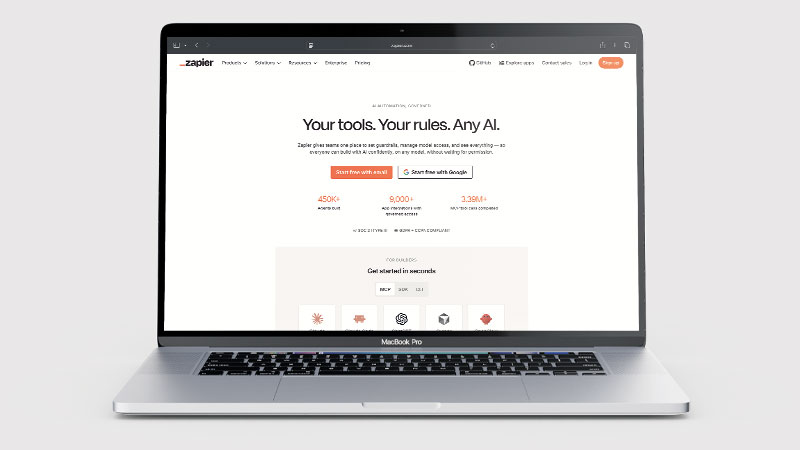
What is Zapier?
Zapier is a no-code automation platform that connects thousands of apps and services, allowing you to build automated workflows (called Zaps) without writing any code. When something happens in one app (a trigger), Zapier automatically performs actions in other apps — no manual work required.
More recently, Zapier has expanded significantly into AI. It now offers AI Agents that can perform multi-step tasks autonomously, AI Chatbots that you can embed on your website, a Canvas tool for visually mapping workflows, Tables for storing data, and Forms for capturing inputs — all integrated into one automation ecosystem powered by AI.
What Can You Do With Zapier?
Zapier connects the apps you already use so they talk to each other. Here is what it covers.
- Connect 9,000+ apps — Zapier has by far the largest integration library available.
- Automate without code — Zapier is genuinely usable by non-technical people on the first try.
- Chain multi-step workflows — Zapier runs sequences with conditions, filters and delays.
- Use AI agents — Zapier’s Agents handle multi-step tasks autonomously rather than following fixed rules.
- Store and collect data — Zapier includes Tables, Forms and Interfaces so you do not need a separate database.
- Start free — Zapier’s free plan covers 100 tasks and five Zaps a month.
- Watch the task counter — Zapier bills per task, and multi-step Zaps consume them quickly.
Zapier Pricing
| Plan | Price | Tasks/mo | Key Features |
|---|---|---|---|
| Free | $0/mo | 100 | 5 Zaps, basic single-step automation |
| Professional | From ~$30/mo | 750+ | Unlimited Zaps, multi-step workflows, filters, paths |
| Team | From ~$77/mo | 2,000+ | Unlimited users, shared workspaces, SSO |
| Enterprise | Custom | Custom | Advanced security, admin controls, dedicated support |
The free plan is genuinely useful for light automation. Key fine print: each action step in a Zap counts as one task against your monthly limit — a 3-step Zap uses 3 tasks per run, not 1. When you reach your monthly task limit, Zaps pause completely until the next billing cycle (no automatic overage charges). The free plan checks for triggers every 15 minutes; paid plans update every 1–2 minutes. Professional starts at approximately $20/month (billed annually) or $30/month (billed monthly). Annual plans are charged upfront for the full year.
Key Use Cases
Zapier’s use cases are almost limitless thanks to its 9,000+ app integrations. Popular examples include automatically adding new form submissions to a CRM or spreadsheet, sending Slack notifications when a sale is made, syncing new email subscribers to a marketing tool, posting to social media on a schedule from a content spreadsheet, creating support tickets from emails, and routing leads to the right salesperson based on location or product interest. With AI Agents, Zapier can now handle more complex multi-step tasks that require decision-making rather than just simple trigger-action pairs.
What Are the Downsides of Zapier?
Zapier’s task-based pricing can become expensive for high-volume workflows — each action in a multi-step Zap counts as a separate task. Very complex automations can require careful planning to avoid hitting limits. The free plan’s 100 tasks per month is limiting for anything beyond occasional use. While Zapier’s AI Agents are improving, they are still maturing compared to dedicated AI automation platforms. Pricing is in USD, which adds minor FX complexity for UK businesses.
Zapier Review: Pros & Cons
Zapier Pros
- 9,000+ app integrations — by far the largest library available
- Free plan to get started without commitment
- No coding required — genuinely beginner-friendly
- AI Agents for autonomous multi-step task handling
- Tables, Forms, Canvas, and Chatbots included in the platform
- Trusted by 3 million+ businesses globally
- Extensive template library to get started quickly
Zapier Cons
- Task-based pricing gets expensive at high volumes
- Free plan limited to 100 tasks and 5 Zaps
- Multi-step Zaps consume tasks quickly
- USD pricing with no GBP option
- AI Agents still maturing versus dedicated AI tools
Who Is Zapier For?
Zapier is for anyone who works with multiple digital tools and wants them to work together automatically. It is particularly strong for small business owners and solo operators who spend too much time on repetitive manual tasks, marketing teams that need to sync leads and contacts across tools, e-commerce businesses automating order processing and customer follow-up, and operations managers wanting to streamline internal workflows without a development team. If you use more than three or four apps in your business and find yourself copying and pasting data between them, Zapier will almost certainly save you time.
Is Zapier Good? Our Verdict
Yes — we scored Zapier 9/10. It is the easiest automation tool to get working on your first try and its 9,000+ integrations are far beyond any rival. Task-based pricing is the cost of that: it gets expensive at volume, and the free plan is 100 tasks a month.
This Zapier Review has found that Zapier is the undisputed leader in no-code workflow automation and has earned that position through genuine breadth and reliability. The addition of AI Agents, Chatbots, and Tables shows it is evolving beyond simple trigger-action automation into a full AI orchestration platform. The free plan makes it easy to try, and the Professional plan at around $30/month is excellent value for small businesses with regular automation needs. For any UK business that wants its apps to work together without manual effort, Zapier is an essential tool.
Zapier Review Rating: 9/10
Every tool we review is signed up for and tested by hand. See how we test and score.
Zapier Score Breakdown
| Output quality | 9/10 | Automations run reliably at scale — the category benchmark |
| Ease of use | 9.5/10 | The easiest automation tool to get working on your first try |
| Features | 9.5/10 | 9,000+ integrations, more than any rival comes close to |
| Value for money | 7.5/10 | Task-based pricing gets expensive fast, and free is 100 tasks a month |
| Overall score | 9/10 | The default automation tool, and worth the premium for most people |
Frequently Asked Questions
Is Zapier worth it?
For most people, yes. Zapier connects more apps than anything else and works first time without technical knowledge, which is what you are paying the premium for. At high task volumes it gets expensive — that is the point at which Make.com or Activepieces start to make sense.
Is Zapier free?
Yes. Zapier has a free plan that includes 100 tasks per month and up to 5 Zaps. It is enough to automate a few basic workflows and test the platform before upgrading.
What is a Zap?
A Zap is an automated workflow in Zapier. It consists of a trigger (something that happens in one app) and one or more actions (things Zapier does in response in other apps). Important: each action step counts as one task against your monthly allowance — so a Zap with 3 action steps uses 3 tasks every time it runs, not 1. On the free plan (100 tasks/month), that same 3-step Zap exhausts your allowance after roughly 33 runs.
Does Zapier work with UK tools and apps?
Yes. Zapier supports thousands of apps used by UK businesses including Xero, HubSpot, Mailchimp, Google Workspace, Slack, Shopify, and many more. Almost any business software your company uses will have a Zapier integration.
What is the difference between Zapier and Make (formerly Integromat)?
Both are automation platforms. Zapier has a larger app library and is generally easier for beginners. Make (formerly Integromat) offers more complex visual workflow logic at a lower per-task cost, and tends to appeal to more technical users who want greater control over their automation flows.
How Does It Compare?
Zapier vs Make.com
| Feature | Zapier | Make.com |
|---|---|---|
| Free plan | ✓ 100 tasks/month | ✓ 1,000 ops/month |
| Starting price | ~£16/month | ~£9/month |
| App integrations | 9,000+ | 1,500+ |
| Visual workflow builder | ✗ Linear steps | ✓ Full canvas |
| Advanced logic | ✓ Basic | ✓ Yes |
| Best for | Beginners | Power users |
See our full Zapier vs Make.com comparison →
👉 See our full Zapier vs n8n comparison →
Looking to switch? See our Make.com alternatives comparison: Zapier vs n8n vs Activepieces.
Alternatives to Zapier
Was our Zapier Review useful? Considering other automation options? Here are some alternatives:
- Make (formerly Integromat) — More flexible visual logic at lower per-task costs; better for complex workflows
- n8n — Open-source automation with self-hosting option for maximum control and cost savings
- Base44 — If you want to build a custom app with built-in automation rather than connecting existing tools
⚙️ Make.com
Best if you need more powerful visual automation — Make’s canvas builder handles complex conditional logic and data transformation that Zapier cannot match, at a lower price.
More AI Tool Reviews

James is an SEO and content specialist with over 12 years’ experience, and tests AI tools so everyday people don’t have to. WhatAITools.co.uk covers honest, no-jargon reviews to help you find the right tool for your needs.
Leave a Reply