⚠️ Affiliate Disclosure: This post is not an affiliate associated review. It may become one in the future and this disclosure will reflect that. This does not affect my reviews and I only recommend tools I genuinely believe in.
This n8n review examines the open-source automation tool that lets you build complex workflows for free — if you’re willing to self-host it. We tested it against the paid alternatives to see whether the setup effort is worth the savings. Here’s what we found.
n8n Review
n8n is the open-source automation platform that gives you genuine control over your workflows — including where your data goes. It offers the power of tools like Make.com and Zapier, but with the option to self-host it on your own server. If data privacy, cost control, or full customisation matter to you, n8n is unlike anything else in this category.
What is n8n?
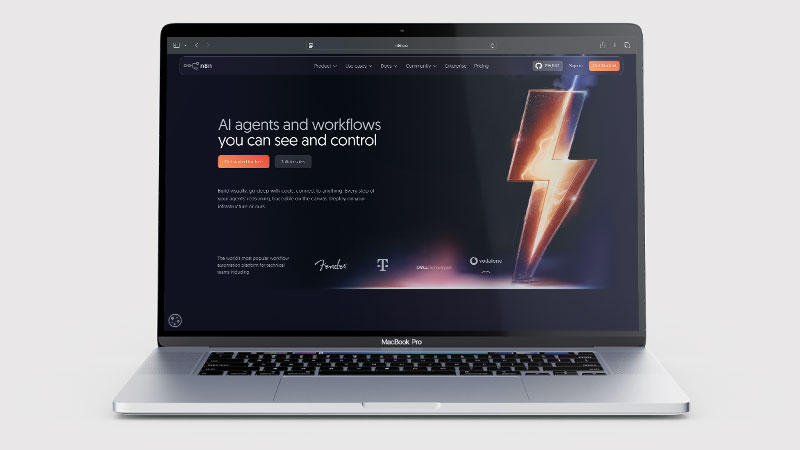
n8n (pronounced “nodemation”) is a workflow automation platform that connects apps, processes data, and automates repetitive tasks using a visual node-based editor. What makes it unique is that it’s open source and self-hostable — meaning you can run it entirely on your own server, keeping all your data in-house, with no per-operation charges and no usage limits beyond your own infrastructure.
It also offers a managed cloud version if you’d rather not manage your own server. n8n supports over 400 integrations and allows custom code via JavaScript nodes, making it a favourite among developers and technical teams who want the flexibility of code with the speed of a visual builder.
What Can You Do With n8n?
n8n can automate virtually any workflow that involves moving or transforming data between systems. Common uses include CRM automation, IT operations workflows, data pipeline construction, API integration, lead processing, and internal tooling. The Code node lets you write custom JavaScript directly within a workflow, which means you’re never blocked by what the visual interface supports.
n8n has also added AI agent workflows — you can build chains of AI actions that use tools like GPT-4, search the web, process files, and make decisions, all within the same visual workflow environment. This makes it one of the more capable platforms for building AI-powered automations.
n8n Pricing
| Plan | Price/month | What’s included |
|---|---|---|
| Self-hosted (Community) | Free forever | Unlimited workflows, unlimited executions on your own server |
| Starter (Cloud) | From £20/month | 2,500 workflow executions/month, managed hosting |
| Pro (Cloud) | From £50/month | 10,000 executions/month, custom variables, team features |
| Enterprise | Custom | Unlimited, SSO, SLA, custom support |
The self-hosted Community version is completely free with no execution limits — you just need a server (a basic VPS costs around €5–10/month). For cloud plans: an “execution” means one workflow run, regardless of how many steps it contains — unlike Zapier or Make where each step counts separately. Cloud plans start with a 14-day free trial. Annual billing is available and saves around 20% versus monthly. Prices shown are in EUR. Cloud plan executions do not roll over to the following month.
n8n Review: Pros and Cons
n8n Pros
- Self-hosted option — full data control and no usage limits
- Free forever on self-hosted
- Custom JavaScript nodes for advanced logic
- AI agent workflows built in
- Active open-source community
n8n Cons
- Self-hosting requires technical setup
- Steeper learning curve than Zapier or Make
- Fewer pre-built integrations than Make (400+ vs 1,500+)
- Cloud plans are more expensive than competitors at scale
- Interface less polished than Make.com
Who Is n8n For?
n8n is built for developers and technical teams who want a self-hosted, open-source automation tool with full control over their workflows, data, and infrastructure. If data privacy, cost at scale, or the ability to customise every node matters to your organisation, n8n gives you capabilities that hosted platforms cannot match. It requires technical setup and maintenance, so it is not suited to non-technical users looking for a managed, no-code solution.
Key Use Cases
Data-sensitive businesses that can’t use cloud tools. Industries like healthcare, legal, and finance often have strict data handling requirements. Self-hosting n8n means your automation data never leaves your own infrastructure — a genuinely significant advantage when cloud tools would create compliance issues.
Developer-led teams building complex internal tools. The ability to write custom JavaScript inside workflows is a major advantage for technical teams. n8n can replace what would otherwise be bespoke code — internal APIs, data transformation pipelines, and operational tooling — with visual workflows that non-developers can later understand and maintain.
AI agent and LLM workflows. n8n’s built-in AI node support makes it well-suited to building AI-powered pipelines — chains of actions where an AI model makes a decision, calls a tool, processes the result, and triggers the next step. This is increasingly one of its strongest use cases.
Cost-sensitive teams with high automation volume. Because the self-hosted version has no per-execution charges, organisations running thousands of automations per day can do so for the cost of a small server. For high-volume use cases, this is dramatically cheaper than Zapier or Make.
What Are the Downsides of n8n?
Self-hosting is not plug-and-play. Setting up a self-hosted n8n instance requires a server, some command-line familiarity, and ongoing maintenance. It’s not difficult if you’re technically inclined, but it’s a meaningful barrier for non-technical users.
Fewer native integrations than Make. With around 400 integrations compared to Make’s 1,500+, n8n’s built-in connector library is smaller. The HTTP node lets you call any API, but this requires more setup than a pre-built connector. If your stack includes less common apps, check n8n’s integration list before committing.
Not beginner-friendly. n8n rewards investment in learning it, but it’s not the right tool for someone who wants to set up a simple automation quickly. The combination of nodes, expressions, and data structures has a real learning curve, even compared to Make.
How Does It Compare to Make.com?
Make.com is easier to use, has more native integrations, and has a more polished interface. n8n is more powerful for technical teams, offers self-hosting for data control, and is effectively free at high volumes when self-hosted. For non-technical users or teams that want managed hosting, Make is the better choice. For developers or businesses with data privacy requirements, n8n is hard to beat.
👉 See our full Zapier vs n8n comparison →
👉 See our full Make.com vs n8n comparison →
| Feature | n8n | Make.com |
|---|---|---|
| Self-hosting | ✅ Yes | ❌ No |
| Visual builder | Good | ⭐ Excellent |
| Free tier | Unlimited (self-hosted) | 1,000 ops/mo |
| Code nodes | ✅ Yes | ❌ Limited |
| Pricing | Free self-hosted; cloud from $20/mo | From $9/mo |
| Best for | Developers & technical teams | Non-technical power users |
Is n8n Good? Our Verdict
Yes, for technical teams — we scored n8n 8/10. It handles workflows other tools cannot, the AI workflow support is ahead of most rivals, and self-hosting is free with full data control. Self-hosting needs real technical setup, and it is steeper than Zapier or Make.
n8n is the best automation platform for technical teams who want maximum flexibility, data control, and cost efficiency. The self-hosted free tier alone makes it compelling for high-volume use cases. The AI workflow support is genuinely ahead of most competitors. The trade-off is setup complexity — if you want something that just works out of the box, Make or Zapier will serve you better.
Best for: Developers, technical teams, data-sensitive businesses, and high-volume automation use cases.
Not ideal for: Non-technical users or anyone who wants a quick, managed solution without infrastructure responsibility.
n8n Score Breakdown
| Output quality | 9/10 | Handles demanding technical workflows that other tools cannot |
| Ease of use | 6.5/10 | Self-hosting needs real technical setup, and it is steeper than Zapier or Make |
| Features | 9/10 | AI workflow support ahead of most rivals, with full data control |
| Value for money | 8.5/10 | Self-hosted is free, though cloud plans cost more than competitors at scale |
| Overall score | 8/10 | The best automation platform for technical teams, unsuitable for anyone else |
n8n Review Rating: 8/10
Frequently Asked Questions
Is n8n worth it?
For technical teams, yes. Self-hosted n8n is free with full data control, which makes it the cheapest option at high volume by a wide margin. Cloud plans cost more than competitors, and self-hosting needs someone who can run it.
Is n8n really free?
The self-hosted Community version of n8n is completely free with no workflow or execution limits. You need to provide your own server (a basic VPS costs £5–10/month). The managed cloud plans are paid, starting from around £20/month.
Do I need to know how to code to use n8n?
Not strictly — n8n has a visual workflow editor and many tasks can be done without writing code. However, to get the most out of it (especially the Code node and expression builder), some technical knowledge helps. It’s more developer-friendly than Zapier or Make, and rewards users who can write basic JavaScript.
How do I pronounce n8n?
n8n is pronounced “nodemation” — the 8 represents the eight letters between the “n”s in “nodemation.”
Can n8n replace Zapier?
For technical teams, yes — n8n can do everything Zapier does and more. For non-technical users who want a simple, managed tool with lots of pre-built integrations and good support, Zapier or Make.com may be more practical. n8n’s self-hosted option is also dramatically cheaper than Zapier for high-volume use.
What is the difference between n8n cloud and self-hosted?
The cloud version is managed by n8n — you pay a monthly subscription and don’t need to worry about servers, updates, or uptime. The self-hosted version runs on your own infrastructure, is free, has no execution limits, and keeps all your data on your own server. Self-hosting requires technical setup; the cloud version works out of the box.
Can I cancel my n8n cloud subscription?
Yes — cancel anytime from your n8n account settings. Access continues to the end of the current billing period with no further charges. Cloud plans include a 14-day free trial, so you can test fully before being charged. Annual cloud plans are billed upfront for the year with no refund for unused months. The self-hosted Community version has no subscription to cancel and remains free forever.
Looking to switch? See our Make.com alternatives comparison: Zapier vs n8n vs Activepieces.
n8n Alternatives Worth Considering
n8n is the best open-source automation platform for technical teams, but depending on your setup, one of these alternatives might be a better fit:
⚙️ Make.com
Best if you want powerful visual automation without managing your own server — similar complexity in a fully managed cloud tool.
⚡ Zapier
Best if you want the easiest automation platform to get started with — more pre-built integrations, simpler setup, no infrastructure to manage.
Every tool we review is signed up for and tested by hand. See how we test and score.

James is an SEO and content specialist with over 12 years’ experience, and tests AI tools so everyday people don’t have to. WhatAITools.co.uk covers honest, no-jargon reviews to help you find the right tool for your needs.
Leave a Reply