⚠️ Affiliate Disclosure: This post is not an affiliate associated review. It may become one in the future and this disclosure will reflect that. This does not affect my reviews and I only recommend tools I genuinely believe in.
This Bubble review tests the no-code app builder that claims anyone can build a fully functional web app without writing a single line of code. We built a working project from scratch to see how far the platform actually takes you. Here’s what we found.
Bubble Review
When people talk about no-code app development, Bubble almost always comes up. It has been the go-to platform for serious no-code builders since 2012, powering everything from simple MVPs to fully-fledged SaaS companies with thousands of users. More recently, Bubble has added AI-assisted building to keep pace with a rapidly changing market. In this Bubble Review we explore all there is to know.
What is Bubble?
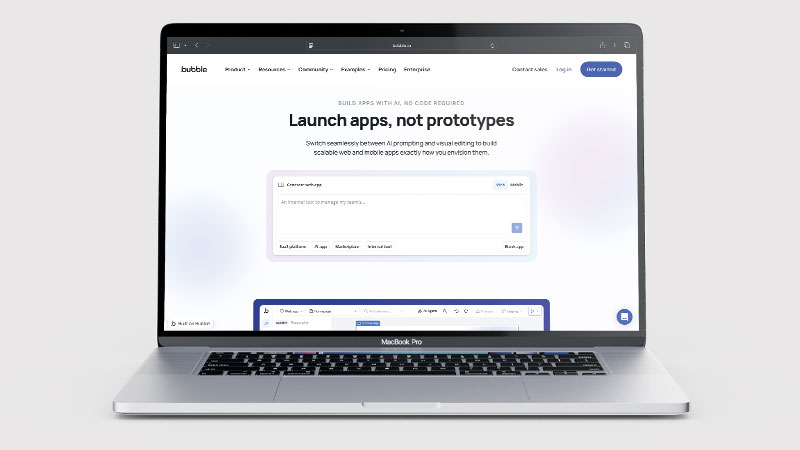
Bubble is a visual no-code development platform that allows users to design, build, and launch web and mobile applications without writing code. It combines a visual drag-and-drop editor with a powerful workflow engine, a built-in database, and privacy rules — giving you the flexibility to build genuinely complex applications that can scale to enterprise level.
Unlike simpler website builders, Bubble lets you create real app logic: conditional workflows, dynamic data, API connections, user authentication, and more. Its AI features now let you build faster — you can describe what you want and the AI generates elements, pages, and workflows — while the visual editor lets you fine-tune with precision.
What Can You Do With Bubble?
Bubble is the most capable no-code platform, and the hardest. Here is what it can build.
- Build genuinely complex applications — Bubble handles logic other no-code tools simply cannot.
- Design visually with precision — Bubble gives you pixel-level control rather than templates.
- Extend with plugins — Bubble has a marketplace running to thousands of integrations.
- Use AI assistance while building — Bubble pairs AI generation with manual editing.
- Version and branch your work — Bubble supports proper version control, unusual in no-code.
- Build and test free — Bubble’s free plan covers development; you pay to go live.
- Allow time to learn — Bubble has the steepest learning curve in this category by some way.
Bubble Pricing
| Plan | Price | Key Features |
|---|---|---|
| Free | $0/mo | Build and test apps; Bubble subdomain; no custom domain |
| Starter | $29/mo | Custom domain, 2 app collaborators, basic server capacity |
| Growth | $119/mo | More capacity, API workflow runs, version control |
| Team | $349/mo | Unlimited collaborators, branch testing, higher capacity |
| Production | $529/mo | Dedicated server, maximum performance |
Bubble’s free plan is genuinely useful for learning and prototyping, but has two important limitations: it only runs on a Bubble subdomain (no custom domain), and apps go into hibernation after inactivity — meaning real visitors see a loading delay when waking the app up. A custom domain and always-on availability require the Starter plan ($29/month) at minimum. All paid plans include a monthly Workload Unit (WU) allowance that caps how much server capacity your app can use — high-traffic apps may need to upgrade or purchase additional capacity. Annual billing is available on all paid plans and saves approximately 20% versus monthly pricing. Pricing is in USD.
Key Use Cases
Bubble’s strength is in building real, scalable web applications. Popular use cases include SaaS products and subscription platforms, marketplace apps (buyers and sellers), internal business tools like CRMs and dashboards, community platforms and member portals, booking and service apps, and e-commerce stores with complex logic. Many successful startups have launched and scaled entirely on Bubble before eventually moving to custom code — or staying on Bubble permanently.
What Are the Downsides of Bubble?
Writing this Bubble Review we discovered that Bubble has a significant learning curve compared to newer AI-first builders like Base44 or Hostinger Horizons. Building complex apps requires a real time investment to understand how Bubble’s data, workflow, and design systems interact. Performance can be a concern on lower plans under high traffic. Pricing escalates quickly once you need more capacity or collaborators, and all plans are billed in USD. Bubble also builds web apps only — there is no native iOS or Android output.
Bubble Review: Pros & Cons
Bubble Pros
- The most powerful no-code platform for complex apps
- Free plan for building and testing
- Massive plugin marketplace (thousands of integrations)
- AI-assisted building alongside visual precision editing
- Version control and branch testing on higher plans
- Proven at scale — many real businesses built on Bubble
- Large community and extensive documentation
Bubble Cons
- Steep learning curve for beginners
- Performance can lag on lower plans under traffic
- Pricing escalates significantly for high-capacity needs
- USD pricing — slight FX risk for UK users
- Web apps only, no native mobile output
- AI features not as seamless as newer AI-first competitors
Who Is Bubble For?
Bubble is best suited to ambitious founders, product managers, and technical non-developers who want to build something genuinely complex and scalable without a development team. If you want to launch a SaaS product, a two-sided marketplace, or a feature-rich web application — and you are willing to invest the time to learn the platform — Bubble remains the gold standard. It is overkill for simple tools or MVPs where a newer AI-first builder would get you live faster.
How Does Bubble Compare to Replit?
Bubble and Replit are two of the most popular ways to build apps without a traditional development setup — but they serve very different users. Bubble is a visual no-code builder; Replit is a cloud coding environment with AI assistance. If you’re weighing both, our full comparison breaks down the key differences.
👉 See our full Bubble vs Replit comparison →
Is Bubble Good? Our Verdict
Yes, if you can learn it — we scored Bubble 7.5/10. It builds genuinely complex applications that other no-code tools cannot, with real version control and a huge plugin marketplace. The learning curve is the steepest in the category, and pricing escalates sharply with capacity.
Bubble is the most capable no-code platform for building serious web applications, and its longevity and track record set it apart from newer entrants. The learning curve is real, but so is the power. For founders and product teams who want to build a scalable business on no-code foundations, Bubble remains a top-tier choice. Newer AI-first builders are easier to start with, but Bubble gives you more ceiling when your product gets complex.
Bubble Review Rating: 7.5/10
Every tool we review is signed up for and tested by hand. See how we test and score.
Bubble Score Breakdown
| Output quality | 8.5/10 | Builds genuinely complex applications that other no-code tools cannot |
| Ease of use | 6/10 | The steepest learning curve of any tool in this category |
| Features | 9/10 | Unmatched depth, with a large plugin ecosystem |
| Value for money | 7/10 | Pricing escalates sharply with capacity, and performance lags on lower plans |
| Overall score | 7.5/10 | The most powerful no-code platform, and the hardest to learn |
Frequently Asked Questions
Is Bubble worth it?
If your app is genuinely complex, yes. Bubble builds things no other no-code platform can, and you can develop free before paying to launch. Pricing escalates sharply with capacity, and the learning curve means budgeting weeks rather than days.
Is Bubble really free?
Yes — Bubble’s free plan lets you build and test apps with no time limit. However, two important caveats: free apps run on a Bubble subdomain only (no custom domain), and they hibernate after inactivity, so real visitors may see a slow loading screen when the app wakes up. This makes the free plan genuinely useful for development and testing, but not for launching an app to real users. You need the Starter plan ($29/month) for a custom domain and always-on availability.
How long does it take to learn Bubble?
Most beginners can build simple apps within a few hours using Bubble’s tutorials. Building complex, production-ready apps typically requires several days or weeks of learning. Bubble has extensive documentation and a large community to support you.
Can I build a SaaS with Bubble?
Yes. Many real SaaS businesses are built and run on Bubble. It supports subscription billing via Stripe, user management, multi-tenancy, and complex logic needed for proper SaaS products.
Does Bubble have AI features?
Yes. Bubble now includes AI-assisted building where you can describe what you want to create and the AI generates elements, pages, and workflows. You can then refine them visually.
Can I cancel my Bubble subscription?
Yes — cancel anytime from your Bubble account settings. Your plan stays active until the end of the current billing period. Annual plans are billed upfront for the full year with no partial refunds for unused months. If you cancel a paid plan your app continues to run but reverts to free plan limitations (Bubble subdomain, hibernation) at the next renewal date.
Alternatives to Bubble
Did this Bubble Review inform you of everything you needed? Not sure if Bubble is right for you? Consider these alternatives:
- Base44 — Much easier to start with using pure AI; better for simple-to-medium complexity apps
- Hostinger Horizons — Great if you need hosting, domain and app builder in one affordable package
- Replit — For builders who want to see and edit code alongside AI assistance
More AI Tool Reviews

James is an SEO and content specialist with over 12 years’ experience, and tests AI tools so everyday people don’t have to. WhatAITools.co.uk covers honest, no-jargon reviews to help you find the right tool for your needs.
Leave a Reply