⚠️ Affiliate Disclosure: This post is not an affiliate associated review. It may become one in the future and this disclosure will reflect that. This does not affect my reviews and I only recommend tools I genuinely believe in.
This OpusClip review covers the AI video clipping tool that promises to turn long-form content into viral short clips automatically. We put it through its paces to see whether it lives up to the hype.
OpusClip Review
OpusClip is an AI video repurposing tool that takes your long-form video — a podcast, a webinar, a YouTube video — and cuts it into short clips ready for TikTok, Instagram Reels, and YouTube Shorts. A 60-minute episode becomes 10 ready-to-post clips in under 10 minutes, with auto-captions included. Here’s what it actually delivers.
What is OpusClip?
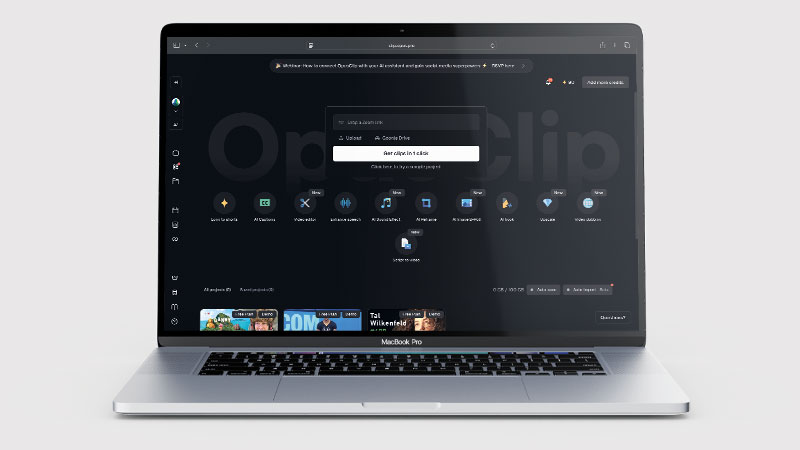
OpusClip (also known as Opus Pro) is an AI-powered video clipping platform. You upload a video file or paste a YouTube URL, and the AI identifies the most engaging moments — strong hooks, emotional statements, impactful data points — then cuts them into vertical short-form clips scored with a virality prediction from 0–100.
The platform is primarily used by podcasters, YouTubers, course creators, and social media managers who need to distribute content across TikTok, Instagram, and YouTube Shorts consistently. It removes the biggest bottleneck in short-form content: sitting in an editing timeline manually deciding what to cut and how to reframe it.
What Can You Do With OpusClip?
Upload any video file or paste a YouTube URL. OpusClip’s AI analyses the content for strong hooks, emotional moments, and engagement peaks. Within minutes it generates clips — each scored with a virality number based on hook strength, pacing, and speaker delivery. Think of the score as a useful filter, not a guarantee: it predicts engagement using a general model, and your specific audience always matters more than any algorithm’s estimate.
Clips come with auto-generated captions (accurate word-level timing, available in 20+ languages on paid plans), auto-reframing from horizontal to vertical format, and a brand kit for logos, fonts, and colours. On Pro plans, batch processing handles multiple videos simultaneously, and social scheduling lets you publish clips directly from the platform.
OpusClip Pricing
| Plan | Price/month | Credits/month | Key features |
|---|---|---|---|
| Free | $0 | 60 | Watermarked output, 1080p max, clips expire after 3 days |
| Starter | $15 | 150 | No watermark, animated captions in 20+ languages, 1 brand template |
| Pro | $29 (or $14.50/mo annually) | 300 | AI B-roll, social scheduling, batch processing, 2 brand templates, XML export |
| Business | Custom | Unlimited | API access, unlimited seats, dedicated support |
For a creator publishing 4 hour-long podcasts per month, the Pro plan at 300 credits/month covers the workload comfortably — roughly $0.24 per minute of processed video, or $2–3 per finished clip. Check OpusClip’s website for current pricing as plans are updated regularly.
OpusClip Review: Pros and Cons
OpusClip Pros
- 60-minute video becomes 10+ clips in under 10 minutes
- Auto-captions in 20+ languages — accurate and well-formatted
- Virality scoring gives a useful priority ranking for clips
- Auto-reframes horizontal to vertical footage for short-form platforms
- Brand kit for consistent logos, fonts, and colours
- Free plan available — no credit card required to test
- Social scheduling on Pro plan
- Batch processing for multiple videos simultaneously
OpusClip Cons
- Clips can feel generic — AI optimises for universal engagement, not your specific audience
- Virality score is a rough guide, not a reliable predictor
- Educational or narrative content clips poorly — the AI misses context
- No personalisation to your audience or past performance data
- Entirely dependent on having existing long-form footage to clip
- Free plan watermark and 3-day clip expiry aren’t useful for real publishing
Who Is OpusClip For?
OpusClip is built for video content creators, podcasters, and social media marketers who want to repurpose long-form video into short, shareable clips for TikTok, Instagram Reels, and YouTube Shorts. If you are sitting on hours of recorded content and want to extract the best moments without manual editing, it saves significant time. It is less suited to creators who need fine-grained editorial control over every clip.
Key Use Cases
Podcasters with regular weekly episodes. A 60-minute episode produces 8–10 usable clips. The Pro plan’s 300 credits/month handles four monthly episodes comfortably, and the auto-caption quality is among the best available for audio-dominant content. This is OpusClip’s strongest use case — strong conversational statements clip reliably and look professional without any manual editing.
Course creators and webinar hosts with video archives. Long educational recordings are full of quotable, shareable moments that are difficult to find manually. OpusClip surfaces them automatically — you review and approve rather than scrub through footage. If you have a backlog of webinar recordings sitting unused, OpusClip can turn that archive into months of social content.
Social media managers handling multiple clients. Batch-process multiple clients’ video recordings to produce short-form content at volume without a separate editing team. The brand kit keeps each client’s output visually consistent without manual formatting on every clip.
What Are the Downsides of OpusClip?
It’s derivative by nature. OpusClip can only work with footage you’ve already filmed. If your long-form recording schedule drops — illness, travel, a busy week — your short-form supply disappears with it. The tool has no solution for this fundamental constraint.
Clips can lack context. A powerful 60-second moment from a 2-hour conversation can be confusing or misleading in isolation. Reviewing every clip before posting is still essential — the AI picks what sounds impactful, not necessarily what is accurate or representative.
Nuanced content doesn’t clip well. If your value is in reasoning, building a case, or telling a story that pays off over 10 minutes, the AI will consistently pick the wrong moments. It optimises for punchy, standalone statements. Educational, analytical, and narrative-led content is better clipped manually.
How Does It Compare to Descript?
OpusClip prioritises speed; Descript gives you control. Descript is a transcription-first editor where you cut video by editing the transcript — every second of the finished clip is exactly what you decided to include. It’s slower per clip but produces higher quality output. If volume and speed are the priority, OpusClip wins clearly. If editorial precision matters — for professional creators, agencies, or content where accuracy is non-negotiable — Descript is worth the extra time.
| Feature | OpusClip | Descript |
|---|---|---|
| Speed (60-min video → clips) | ✅ Under 10 minutes | ⚠️ Manual editing required |
| Editorial control | ⚠️ AI decides | ✅ You decide every cut |
| Caption quality | ✅ Excellent | ✅ Excellent |
| AI filler word removal | ❌ No | ✅ Yes |
| Virality scoring | ✅ Yes | ❌ No |
| Starting price | $15/month | $16/month |
| Best for | Volume and speed | Precision and quality |
Is OpusClip Good? Our Verdict
Yes — we scored OpusClip 8.5/10. Paste a link and you get captioned, reframed social clips back with almost nothing to learn. It works best on conversational content: educational and narrative video clips poorly, and the virality score is a rough guide rather than a predictor.
OpusClip delivers on its core promise — turning long video into short clips fast, with good caption quality and a professional finish. Its main limitation is philosophical: it can only remix what you’ve already made. If you record consistently and struggle to keep up with short-form content demands, it removes the biggest bottleneck. If filming is what holds you back, a clipping tool doesn’t solve the underlying problem.
OpusClip Review Rating: 8.5/10
Best for: Podcasters, YouTubers, and social media managers with a consistent long-form output who need short-form clips without manual editing.
Not ideal for: Creators without a steady filming schedule, or those producing educational or narrative content where context matters more than punchy standalone moments.
OpusClip Score Breakdown
| Output quality | 8/10 | Good at finding clippable moments, weaker on educational or narrative content |
| Ease of use | 9/10 | Paste a link and get clips back — almost nothing to learn |
| Features | 8.5/10 | Auto-captioning, reframing and virality scoring built in |
| Value for money | 8/10 | Reasonable, though the virality score is a rough guide rather than a predictor |
| Overall score | 8.5/10 | The quickest route from long video to social clips, best on conversational content |
Frequently Asked Questions
Is OpusClip worth it?
For anyone posting short-form video regularly, yes. OpusClip turns a long recording into captioned, reframed clips in minutes, which is hours of editing saved each week. It works far better on conversational content than on educational or narrative video.
Is OpusClip free?
Yes — the free plan gives you 60 credits per month with watermarked output at 1080p. Clips expire after 3 days, which makes the free plan better for testing than real publishing. The Starter plan at $15/month removes the watermark and is the minimum practical tier for regular use.
How accurate is OpusClip’s AI at finding the best moments?
Good for conversational content with clear hooks and impactful standalone statements. Weaker for educational, analytical, or narrative content where the value builds over time. Treat virality scores as a starting filter — you’ll still want to review clips before publishing to check they make sense in isolation.
Does OpusClip work with podcasts?
Yes — and it’s one of the best use cases. Audio-dominant content with strong conversational statements clips reliably. OpusClip supports audio-only uploads and generates captions from the transcription. For weekly podcasters looking to expand to short-form platforms, it’s the most practical starting point.
Can OpusClip make vertical videos from horizontal footage?
Yes — OpusClip auto-reframes horizontal (16:9) footage to vertical (9:16) using AI to track and centre the speaker. This works reliably for single-speaker talking-head content. For multi-person conversations or content with significant movement, the reframing can be less accurate and may need manual adjustment.
OpusClip vs Descript: which is better?
OpusClip is faster and more automated — the right choice if volume is the priority. Descript gives more editorial control but takes more time per clip. If you want to be specific about what goes into each clip and need to clean up filler words and audio quality too, Descript is worth the extra effort. Many creators use both: OpusClip for quick high-volume output, Descript for more polished hero clips.
OpusClip Alternatives Worth Considering
OpusClip is the leading AI clipping tool for speed and volume — but these alternatives may suit you better depending on your workflow:
🤖 Agent Opus
From the same team as OpusClip, Agent Opus does something different: instead of clipping existing footage, it creates brand-new videos from text prompts, blog URLs, scripts, or audio files — no recording required. If you need to create content as well as repurpose it, Agent Opus is the natural companion.
✂️ Descript
Best if you want full editorial control over every clip — you cut video by editing the transcript, so the output is exactly what you chose rather than what the AI selected.
🎬 Vidyo.ai
Best for LinkedIn and professional content — Vidyo.ai offers similar AI clipping with a slightly stronger focus on B2B and professional creator content at comparable pricing.
🎙️ Riverside
Best if you already record podcasts or interviews in Riverside — clips are generated automatically as part of the recording workflow with zero extra setup, and the quality benefits from Riverside’s studio-grade recording.
Every tool we review is signed up for and tested by hand. See how we test and score.

James is an SEO and content specialist with over 12 years’ experience, and tests AI tools so everyday people don’t have to. WhatAITools.co.uk covers honest, no-jargon reviews to help you find the right tool for your needs.
Leave a Reply