⚠️ Affiliate Disclosure: This post is not an affiliate associated review. It may become one in the future and this disclosure will reflect that. This does not affect my reviews and I only recommend tools I genuinely believe in.
This Descript review examines the video and podcast editing platform that turns a script into a cut — letting you edit media by deleting words on a page rather than scrubbing through a timeline. We tested it across real video and podcast production workflows to see whether the AI-powered approach holds up. Here’s our honest verdict.
Descript Review
If you’ve ever spent an hour scrubbing through a timeline to cut ten seconds of “um”s and awkward pauses, Descript will feel like a revelation. It transcribes your video or audio automatically, then lets you edit the media by editing the transcript — delete a sentence from the text, and the corresponding footage disappears. That core idea, deceptively simple, changes how quickly you can get from raw recording to finished cut.
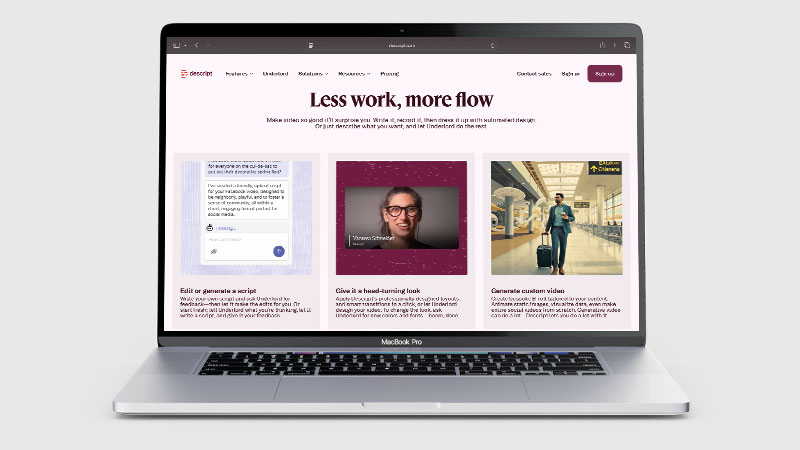
Descript is used by podcasters, YouTubers, course creators, and video teams who want to spend less time in a traditional editor and more time on content. The platform handles the full production workflow: record, transcribe, edit, and export — all in one place, with AI tools layered throughout.
What is Descript?
Descript is an AI-powered video and audio editor built around a text-based editing paradigm. Rather than working with a traditional timeline, you interact with an auto-generated transcript of your recording. Editing the text edits the media: cut a paragraph and the video cuts too. This makes it dramatically faster to remove mistakes, tighten pacing, and restructure content — especially for talking-head video or podcasts where most of the content is speech.
Beyond text-based editing, Descript includes Overdub (an AI voice cloning tool that can fill in missed words or fix mistakes in your own voice), automatic filler word removal, screen recording, AI-generated clip suggestions for social media, and a full suite of export options. It’s cloud-based, so projects are accessible anywhere, and it supports collaboration for teams working on shared media.
What Can You Do With Descript?
The core workflow is: record or import your video or audio, let Descript transcribe it, then edit the transcript to cut and rearrange your content. From there you can remove filler words and silences in bulk with one click, use Overdub to fix specific words without re-recording, add captions, export a finished video, and generate short-form clips for social media.
Podcasters use Descript to produce episodes end-to-end — recording remotely (it has a built-in recording tool), editing for pacing, and exporting audio with chapters and show notes generated automatically. Video creators use it to produce YouTube and course content without learning traditional video editing. Teams use the collaboration features to review, comment, and approve cuts without exporting files back and forth.
Descript Pricing
| Plan | Price | Transcription | Export | Best For |
|---|---|---|---|---|
| Free | $0/mo | 1 hr/month | 720p, watermarked | Trying the tool |
| Hobbyist | $16/mo (annual) | 10 hrs/month | 4K, no watermark | Solo creators |
| Creator | $24/mo (annual) | 30 hrs/month | 4K + filler word removal | Regular publishers |
| Business | $50/mo (annual) | 40 hrs/month | Team features, API | Studios and teams |
The free plan is genuinely usable for occasional work — 1 hour of transcription per month is enough to evaluate the platform properly and publish occasional short content. Most active creators will need Hobbyist at minimum. Creator adds the bulk filler word removal that is one of Descript’s most time-saving features. Business is for teams needing shared workspaces and higher volume.
Descript Review: Pros and Cons
Descript Pros
- Text-based editing is genuinely faster than timeline editing for spoken-word content
- Automatic filler word and silence removal saves significant post-production time
- Overdub AI voice cloning lets you fix mistakes without re-recording
- Free plan is sufficient to properly evaluate the tool
- Works for both video and podcast production in one platform
- Collaboration features are solid for team-based production
Descript Cons
- Cloud-dependent — works poorly on slow connections; no true offline mode
- Overdub voice quality has a ceiling — good but not indistinguishable from real recording
- Export limits on free plan make it impractical for production use
- Not a replacement for full video production with B-roll, motion graphics, or colour grading
- Transcription accuracy drops on heavy accents or fast speech
Who Is Descript For?
Descript is built for video and podcast creators who want to edit audio and video by editing text — cutting, rearranging, and cleaning up recordings the way you would edit a document. If you produce regular podcast or video content and find traditional editing software slow or complicated, Descript dramatically reduces the time to a polished output. It is less suited to professional video producers who need frame-level precision and advanced colour or effects work.
Key Use Cases
Podcast production. Descript is the dominant tool for indie podcasters who want to produce professional-sounding episodes without a studio. Record your guest remotely (Descript has a built-in high-quality recorder), transcribe automatically, edit for pacing and clarity, remove filler words, and export audio — all without touching a DAW. Auto-generated chapters and summaries save hours on show notes.
YouTube and course video. Talking-head and tutorial video benefits enormously from text-based editing. Restructuring a ten-minute video takes minutes instead of hours when you’re working with a transcript. The AI clip suggestion tool can pull out highlight moments for Shorts or Reels automatically.
Marketing and social video. Teams producing interview clips, testimonials, and explainer videos use Descript to cut content quickly and push out multiple formats from a single recording. Captions are added automatically and can be styled to match brand guidelines.
What Are the Downsides of Descript?
Descript is built for spoken-word content. If your production involves significant B-roll, motion graphics, visual effects, or colour work, it will hit a ceiling fast — you will still need a traditional editor like DaVinci Resolve or Premiere Pro for those elements. It is not a replacement for full video production; it is a replacement for the edit stage when the source material is primarily talking.
Cloud dependency is a real limitation. Large video files require upload time, and any interruption to your connection mid-edit is disruptive. For creators working in areas with unreliable internet, this can be a genuine barrier. The platform has also had stability issues at times with large projects, though performance has improved with recent updates.
How Does Descript Compare to Riverside.fm?
Riverside.fm is the go-to tool for remote podcast and video recording — it captures studio-quality separate tracks for each participant regardless of internet quality. Descript is primarily a post-production editor. The two actually complement each other well: many creators record in Riverside and edit in Descript. Where they overlap is in the editing workflow — Riverside has added basic editing features, while Descript has a built-in recorder. For pure recording quality, Riverside wins. For post-production editing speed, Descript is in a class of its own.
| Feature | Descript | Riverside.fm |
|---|---|---|
| Free plan | ✓ 1 hr transcription/mo | ✓ 2 hrs recording/mo |
| Starting price | $16/mo | $15/mo |
| Text-based editing | ✓ | ✗ |
| AI voice cloning | ✓ Overdub | ✗ |
| Filler word removal | ✓ (Creator+) | Basic only |
| Best for | Post-production editing | High-quality recording |
Is Descript Good? Our Verdict
Yes — we scored Descript 9/10. Editing video by deleting words from a transcript is the single biggest time-saver in the category for anyone working with speech, and automatic filler-word removal saves real time. It is cloud-dependent, and free plan export limits make it impractical.
Descript is one of the most genuinely innovative tools in the creator toolkit. The text-based editing approach is not a gimmick — it is meaningfully faster for anyone producing spoken-word content, and the AI features (filler word removal, Overdub, clip generation) compound that advantage. At $16–$24/month for active creators, the time saved per episode or video makes it easy to justify.
It will not replace a full video production suite for complex projects, and the cloud dependency is a genuine limitation for some users. But for podcasters and video creators whose content is primarily speech, Descript is close to essential.
Descript Review Rating: 9/10
Every tool we review is signed up for and tested by hand. See how we test and score.
Best for: Podcasters, YouTubers, and course creators who want to edit audio and video faster using AI-assisted text-based editing.
Not ideal for: Complex video production involving B-roll, motion graphics, or professional colour grading.
Descript Score Breakdown
| Output quality | 9/10 | Text-based editing works remarkably well for spoken-word content |
| Ease of use | 9/10 | Editing a video by deleting words removes most of the learning curve |
| Features | 9/10 | Filler-word removal, Overdub, screen recording and publishing in one place |
| Value for money | 8/10 | Free plan export limits make it impractical, and it needs a solid connection |
| Overall score | 9/10 | The single biggest time-saver in video editing for anyone working with speech |
Frequently Asked Questions
Is Descript worth it?
For anyone editing spoken-word video, yes. Descript removes filler words automatically and lets you cut by deleting text, which saves hours on every project. Free plan export limits make it impractical for real work, so budget for a paid tier.
Is Descript free to use?
Yes — Descript has a free plan that includes 1 hour of transcription per month and 720p export with a watermark. It is enough to evaluate the platform and produce occasional short content, but most regular creators will need the Hobbyist plan ($16/mo annual) for meaningful production work.
What is Overdub in Descript?
Overdub is Descript’s AI voice cloning feature. You train it on a sample of your own voice, and then you can type new words that will be spoken in your voice — useful for correcting mistakes without re-recording. The quality is good for corrections and fill-ins, though it is not indistinguishable from your real recording at high volume.
Can Descript remove filler words automatically?
Yes. On the Creator plan and above, Descript can automatically detect and remove filler words (um, uh, you know, like) and long silences across your entire recording in one click. This is one of its most valuable time-saving features — what used to take an hour of careful listening can be done in seconds.
Does Descript work for both video and podcast editing?
Yes. Descript handles both video (MP4, MOV) and audio (MP3, WAV) files and the text-based editing approach works equally well for both. Many users run their entire podcast production workflow — recording, editing, and exporting — entirely within Descript.
How accurate is Descript’s transcription?
Very accurate for clear speech — typically 95%+ accuracy for standard English with minimal background noise. Accuracy drops with heavy accents, fast speech, technical jargon, or audio with significant background noise. You will need to review and correct the transcript before editing, especially on complex recordings.
Alternatives to Descript
Riverside.fm — The best tool for remote podcast and video recording with studio-quality separate tracks per participant. Use Riverside to record, Descript to edit.
CapCut — A free, mobile-first video editor popular for short-form social content. Less powerful for spoken-word editing than Descript, but free and accessible for quick cuts.
Adobe Premiere Pro — The industry-standard professional video editor. Far more capable for complex productions, but significantly more expensive and requires a longer learning curve.
More from WhatAITools: OpusClip review, Castmagic review and ElevenLabs review.

James is an SEO and content specialist with over 12 years’ experience, and tests AI tools so everyday people don’t have to. WhatAITools.co.uk covers honest, no-jargon reviews to help you find the right tool for your needs.
Leave a Reply