⚠️ Affiliate Disclosure: This post is not an affiliate associated review. It may become one in the future and this disclosure will reflect that. This does not affect my reviews and I only recommend tools I genuinely believe in.
This tl;dv review covers the AI meeting recorder with what may be the most generous free plan in the category — unlimited recordings and transcripts, permanently. We look at where the catch is, what the paid plans add, and whether unlimited free recording is as good as it sounds.
tl;dv Review
Most AI note-takers give you a taste of the free plan and then meter you. tl;dv takes the opposite approach: unlimited recordings and unlimited transcripts in 30+ languages, free, with no time cap.
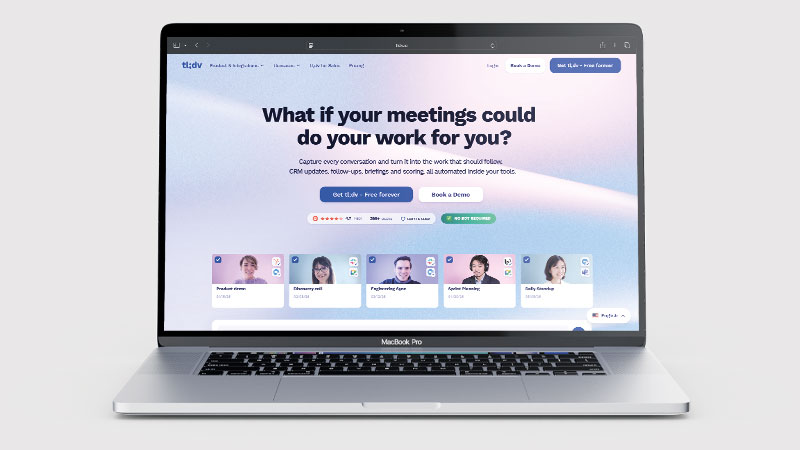
The limit is on AI summaries — you get ten, for the lifetime of the account. That is an unusual way to draw the line, and whether it works for you depends entirely on whether you want recordings or conclusions.
What is tl;dv?
tl;dv joins your Zoom, Google Meet or Microsoft Teams call as a bot, records it, and produces a real-time transcript. Afterwards it can generate an AI summary with action items, identify speakers, and let you search across everything that has been said.
It also has a strong clipping feature — you can grab a moment from a call and share it as a short video, which is genuinely useful for passing customer feedback to a product team without making them watch an hour of footage.
What Can You Do With tl;dv?
tl;dv is an AI meeting recorder rather than a general note-taking app. Here is what it actually does once it is connected to your calendar.
- Record meetings automatically — tl;dv joins Zoom, Google Meet and Microsoft Teams calls and records them without you pressing anything.
- Record without a bot — tl;dv’s desktop app captures your computer’s audio instead of sending a visible bot into the call, which matters now that Google Meet flags third-party notetakers.
- Transcribe in 30+ languages — tl;dv produces a live transcript with speaker labels, unlimited even on the free plan.
- Write AI summaries and action items — tl;dv drafts the write-up and the follow-ups, though the free plan allows only ten summaries for the life of the account.
- Clip and share moments — tl;dv lets you cut a 40-second clip from a call and send it on, so a colleague hears the customer rather than reading your paraphrase.
- Search every past call — tl;dv’s library (paid plans) finds any phrase spoken in any recorded meeting.
- Translate transcripts and summaries — tl;dv can render a call held in one language into another after the fact.
- Push notes into your other tools — tl;dv sends summaries, action items and CRM outcomes to HubSpot, Slack, Notion and thousands of other apps.
- Coach a sales team — tl;dv’s paid tiers score calls against a playbook and pull out real coaching moments from recordings.
tl;dv Pricing
| Plan | Price | What you get |
|---|---|---|
| Free | $0 | Unlimited recordings and transcripts, 30+ languages, 10 lifetime AI summaries |
| Pro | $18/user/mo annual ($29 monthly) | Unlimited AI notes and summaries, recordings kept beyond 3 months, searchable library |
| Business | $59/user/mo annual | Team features, deeper CRM integration, admin controls |
The free plan genuinely gives you unlimited recording and transcription. That alone makes it more useful than most rivals’ free tiers, which cap you on minutes.
Two things to watch. AI summaries are capped at ten for the life of the account, not ten per month. And on the free plan recordings are removed after three months, so it is not a permanent archive.
tl;dv has been running a 40% discount on annual plans since 2025 and it was still live at the time of writing — worth checking before you pay monthly.
tl;dv Review: Pros and Cons
tl;dv Pros
- tl;dv gives you unlimited recordings and transcripts on the free plan
- 30+ languages supported, with good accuracy
- Excellent clip-and-share for surfacing key moments
- Works across Zoom, Google Meet and Microsoft Teams
- Long-running annual discount makes Pro reasonable value
- Searchable library across all past calls on paid plans
tl;dv Cons
- tl;dv caps the free plan at 10 AI summaries — ever, not per month
- Free recordings deleted after three months
- Monthly Pro pricing is a steep jump from the annual rate
- tl;dv’s meeting bot is visible to everyone, though the desktop app can now record bot-free
- Less mature CRM automation than sales-focused rivals
- Business tier gets expensive for small teams
Who Is tl;dv For?
tl;dv suits people who want a searchable record of many meetings without paying per minute. If you are in calls all day and mostly need to find things again later, the free plan does real work.
It suits product, research and customer success teams especially well, because the clipping feature turns a call into shareable evidence.
It suits less well if what you want is the summary rather than the recording — ten lifetime summaries will not last, and at that point you are comparing paid plans like for like.
Key Use Cases
- Customer research — record every interview, clip the moments that matter
- Sales call review — searchable history of what was promised
- Handover and onboarding — new team members can watch key moments rather than read notes
- Multilingual teams — 30+ language transcription without extra cost
- Meeting archive — an unlimited free record of what was discussed
What Are the Downsides of tl;dv?
The bot joining the call is visible, which is fine internally but can feel intrusive on external calls. Some rivals offer quieter capture.
The free plan’s three-month retention means it is not the permanent archive it first appears to be. If you need history beyond a quarter, you are on a paid plan — which is a reasonable business model, but worth understanding upfront.
CRM automation is present but lighter than tools built specifically for sales workflows.
How Does tl;dv Compare to Otter.ai?
| tl;dv | Otter.ai | |
|---|---|---|
| Free recording | Unlimited | 300 mins/month, 30 min cap |
| Free AI summaries | 10 lifetime | Included within minute limits |
| Free retention | 3 months | Retained |
| Real-time transcript | Yes | Yes, stronger |
| Clip and share | Excellent | Basic |
| Entry paid plan | $18/mo annual | $8.33/mo annual |
If you want volume, tl;dv wins on the free plan by a distance. If you want the most accurate transcript and the best real-time experience, Otter still edges it. See our Otter.ai review.
Is tl;dv Good? Our Verdict
Yes, and the free plan is the reason — we scored tl;dv 8/10. Unlimited recording and transcription in 30+ languages costs nothing, and the desktop app can now capture without sending a bot into the call. The ceiling is summaries, not minutes: the free plan allows ten for the life of the account.
tl;dv has made a smart bet: give away the expensive part — recording and transcription — and charge for the intelligence layer on top. For a lot of people that trade is the right way round, because finding what was said matters more than having it summarised.
The clipping feature is the underrated part. Being able to send a 40-second clip of a customer explaining a problem is worth more than any summary, and tl;dv does it better than most.
The ten-lifetime-summaries limit will push you to a paid plan sooner than the marketing implies, and three-month retention on free means this is not a permanent archive. Neither is unreasonable — just know them going in.
tl;dv Review Rating: 8/10
Every tool we review is signed up for and tested by hand. See how we test and score.
Best for: Teams in a lot of calls who need a searchable record and shareable clips without per-minute costs.
Not ideal for: Anyone who mainly wants AI summaries, or who needs a permanent free archive.
tl;dv Score Breakdown
| Output quality | 8/10 | Accurate transcripts across 30+ languages; summaries are solid rather than exceptional |
| Ease of use | 8.5/10 | Connect a calendar and it just runs; clipping is the easiest in the category |
| Features | 8/10 | Bot-free capture, translation, coaching and 5,000+ integrations; CRM automation is lighter than sales-first rivals |
| Value for money | 9/10 | Unlimited free recording and transcription is unmatched; Pro is fair at the annual rate |
| Overall score | 8/10 | The best free tier in the category, with the ceiling set by summaries not minutes |
Frequently Asked Questions
Is tl;dv worth it?
The free plan is worth having regardless. tl;dv gives unlimited recording and transcription for nothing, which no rival matches. You only need to pay when ten lifetime AI summaries run out, and Pro is fair at the annual rate — steep monthly.
Is tl;dv really free?
Yes — unlimited recordings and transcripts in 30+ languages with no time limit. The catches are ten AI summaries for the lifetime of the account and a three-month retention window on recordings.
Does tl;dv work with Zoom, Google Meet and Teams?
Yes. A bot joins the call, records it, and produces a transcript in real time.
How much is tl;dv Pro?
$18 per user per month on annual billing, or $29 monthly. Business is $59 per user per month annually. A 40% annual discount has been running since 2025.
Can I share clips from a meeting?
Yes, and it is one of the strongest features. You can grab a specific moment and share it as a short video rather than sending someone a full recording.
Alternatives to tl;dv
Otter.ai — Better real-time transcript and stronger accuracy, but a much tighter free plan. See our Otter.ai review.
Fireflies.ai — Stronger CRM automation for sales teams that need calls pushed into a pipeline. See our Fireflies.ai review.
MeetGeek — Cleaner summaries and a good middle ground between recording and insight. See our MeetGeek review.
More from WhatAITools: Otter.ai review, Fireflies.ai review and MeetGeek review.

James is an SEO and content specialist with over 12 years’ experience, and tests AI tools so everyday people don’t have to. WhatAITools.co.uk covers honest, no-jargon reviews to help you find the right tool for your needs.
Leave a Reply