⚠️ Affiliate Disclosure: This post is not an affiliate associated review. It may become one in the future and this disclosure will reflect that. This does not affect my reviews and I only recommend tools I genuinely believe in.
Fireflies.ai Review
This Fireflies.ai review examines the AI meeting assistant that promises to record, transcribe, and summarise every meeting so you never have to take notes again. We tested it across Zoom, Google Meet, and in-person calls to see how the transcription quality, summaries, and workflow integrations hold up in real use. Here’s our honest verdict.
Fireflies.ai Review Summary
Fireflies.ai is one of the most mature AI meeting tools on the market, with a feature set that goes well beyond simple transcription. It records your meetings via an AI bot that joins calls automatically, transcribes the audio, generates structured summaries with action items, and integrates those outputs directly into your CRM, task manager, or Slack channel. For sales teams, agencies, and distributed teams who live in meetings, the time savings are real and compounding.
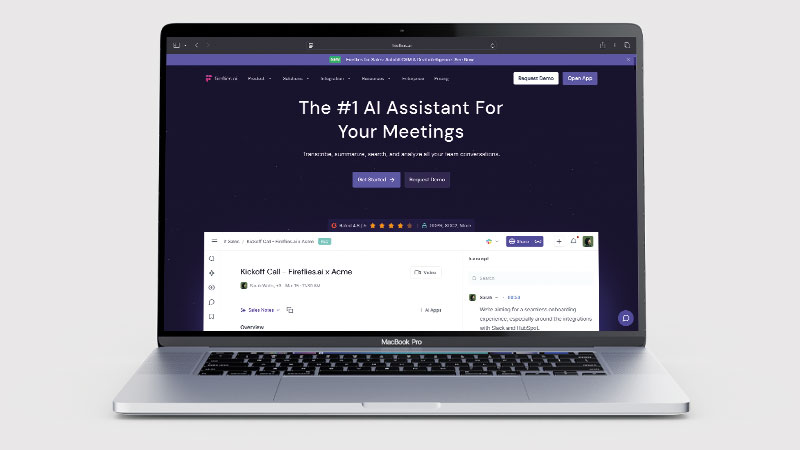
The platform’s key strength is the depth of its integrations — Salesforce, HubSpot, Notion, Asana, Slack, and more — which means meeting summaries and action items can flow automatically into the tools where work actually happens, rather than sitting in a separate notes app nobody checks.
What is Fireflies.ai?
Fireflies.ai is an AI meeting assistant that integrates with your calendar to automatically join and record every scheduled meeting. It then transcribes the recording, identifies speakers, highlights key moments, extracts action items and decisions, and generates a shareable summary. The whole process happens automatically in the background — you do not need to do anything after the initial setup beyond attending your meetings as normal.
The platform also includes a searchable meeting library, meaning you can search across all your past meetings for specific topics, names, or decisions. This turns your meeting history into a queryable knowledge base — useful for recapping decisions, onboarding new team members, or resolving disputes about what was agreed.
What Can You Do With Fireflies.ai?
Fireflies.ai records meetings and then does things with what was said. Here is the full range.
- Record and transcribe automatically — Fireflies.ai joins your calls and produces an accurate transcript with speaker identification.
- Get summaries and action items — Fireflies.ai writes up decisions and next steps in a usable structure.
- Search everything ever said — Fireflies.ai keeps a searchable library across all past meetings.
- Ask questions about a call — Fireflies.ai lets you interrogate a recording rather than rewatching it.
- Push notes into your CRM — Fireflies.ai syncs with the major CRMs, which needs Pro, from $10/seat/mo on annual billing.
- Analyse conversations — Fireflies.ai reports on talk time, sentiment and topics across meetings.
- Record with or without a bot — Fireflies.ai can join as a visible participant, or record from your computer’s system audio via the desktop app.
Fireflies.ai Pricing
| Plan | Price | Storage | AI summaries | Best For |
|---|---|---|---|---|
| Free | $0/mo | 400 mins storage/team | Limited | Testing the platform |
| Pro | $10/seat/mo (annual) | 8,000 mins storage | ✓ Full summaries | Individuals and small teams |
| Business | $19/seat/mo (annual) | Unlimited | ✓ + video recording | Growing teams |
| Enterprise | $39/seat/mo (annual) | Unlimited | ✓ + advanced security | Large organisations |
The free plan’s 400-minute storage limit is the main constraint — under 7 hours of meetings, and shared across the whole team rather than allocated per seat, so it is enough to trial Fireflies.ai but not to run on. Pro at $10/seat/month on annual billing ($18 monthly) is a competitive entry price for teams, and the unlimited storage on Business makes it appropriate for high-meeting-volume organisations. Integrations, including CRM (Salesforce, HubSpot), come with Pro — Fireflies.ai lists unlimited integrations from Pro upward.
Fireflies.ai Review: Pros and Cons
Fireflies.ai Pros
- Fireflies.ai delivers accurate transcription with reliable speaker identification
- AI summaries and action items are well-structured and useful
- Searchable meeting library across all past recordings
- Deep CRM and project management integrations (HubSpot, Salesforce, Notion, Asana)
- Works across Zoom, Google Meet, Teams, and in-person via mobile
- Competitive pricing at $10/seat/mo (Pro annual)
Fireflies.ai Cons
- Fireflies.ai’s AI bot joining calls can feel intrusive — some participants react negatively
- Storage on Fireflies.ai’s free plan (400 mins, shared team-wide) is consumed quickly in meeting-heavy roles
- Transcription accuracy drops with strong accents or poor audio quality
- Summary quality varies — complex technical meetings need more editing than simple ones
Who Is Fireflies.ai For?
Fireflies.ai is built for sales teams, managers, remote workers, and anyone who attends frequent meetings and wants automatic transcription, searchable records, and AI summaries without lifting a pen. If you regularly come out of meetings trying to remember what was said or who was responsible for what, Fireflies.ai removes that problem entirely. It is less suited to users who attend few meetings or work in environments where recording is not permitted.
Fireflies.ai Key Use Cases
Sales teams. Fireflies.ai integrates directly with Salesforce and HubSpot to push call summaries, action items, and transcripts into deal records automatically. Sales managers can review calls without listening to recordings, and reps spend less time on post-call admin. The searchable library makes it easy to find what was promised to a prospect in a specific conversation.
Remote and distributed teams. For teams spread across time zones, Fireflies.ai creates an automatic written record of every discussion — enabling async team members to catch up on what was decided without attending meetings. Meeting summaries integrated into Slack or Notion mean decisions are visible in the tools teams already use.
Agencies and client-facing roles. Client calls are automatically documented with action items and decisions, reducing the need for manual follow-up emails summarising what was discussed. The transcript serves as a reliable reference if there is ever dispute about what was agreed.
What Are the Downsides of Fireflies.ai?
The bot-joins-your-meeting model is Fireflies.ai’s main UX trade-off by default, but it is avoidable: the Fireflies.ai desktop app records from your computer’s system audio instead, so no notetaker joins the call and no bot shows up as a participant. A visible AI bot participant can make external clients uncomfortable, and some organisations have policies against recording calls without explicit consent from all parties. You should always inform participants that a meeting is being recorded — this is a legal requirement in many jurisdictions, not just good practice.
Transcription accuracy, while generally good, is not perfect — particularly with strong accents, fast speakers, or poor audio quality from home connections. Action items require review before acting on them, and the AI occasionally misattributes statements to the wrong speaker in crowded calls.
How Does Fireflies.ai Compare to MeetGeek?
Fireflies.ai and MeetGeek are the two most comparable AI meeting assistants in this price range. Fireflies.ai has deeper CRM integrations and a more mature feature set overall. MeetGeek’s free plan works differently — 3 hours of transcription every month rather than a fixed storage cap — and its interface is arguably cleaner and easier to navigate. Both tools include integrations from their Pro tier, so CRM access alone is no longer the deciding factor: MeetGeek’s Pro is $9.99/user/mo against Fireflies.ai’s $18/seat/mo monthly ($10 annual). Fireflies.ai still has the deeper CRM integrations, and that is what you are paying the difference for. For individuals or smaller teams that prioritise ease of use and a clean meeting library, MeetGeek is worth a look. See our MeetGeek review for a detailed breakdown.
| Feature | Fireflies.ai | MeetGeek |
|---|---|---|
| Free plan | 400 mins storage/team | 3 hrs transcription/month |
| Starting price | $10/seat/mo annual ($18 monthly) | $9.99/user/mo monthly |
| CRM integrations | Pro ($10/seat/mo annual) | Pro ($9.99/user/mo) |
| Searchable library | ✓ | ✓ |
| In-person recording | ✓ Mobile app | ✓ Mobile app |
| Best for | Sales teams, CRM-heavy workflows | Individuals, clean UX |
Is Fireflies.ai Good? Our Verdict
Yes — we scored Fireflies.ai 8/10. Transcription is accurate with reliable speaker identification, the summaries are well structured, and the searchable library across every past meeting is the part teams end up relying on. CRM integrations come with Pro, from $10/seat/mo.
Fireflies.ai is one of the best-developed AI meeting assistants available. The combination of accurate transcription, structured AI summaries, and deep integrations with the tools where work actually happens (CRMs, project managers, Slack) makes it genuinely valuable for teams who spend significant time in meetings. At $10/seat/month on annual billing for the Pro plan, the ROI is easy to justify if it saves even 30 minutes of post-meeting admin per person per week.
The bot participant model requires thoughtful management of participant consent, and the free tier’s 400 minutes are shared across the whole team. But as a core meeting transcription and summary tool, Fireflies.ai is hard to beat.
Fireflies.ai Review Rating: 8/10
Every tool we review is signed up for and tested by hand. See how we test and score.
Best for: Sales teams, agencies, and distributed teams who want automatic meeting documentation with CRM and workflow integration.
Not ideal for: Teams with strict no-recording policies, or users who want the most affordable possible entry to AI meeting notes.
Fireflies.ai Score Breakdown
| Output quality | 8.5/10 | Accurate transcription with reliable speaker identification |
| Ease of use | 8.5/10 | Joins calls automatically and needs almost no management |
| Features | 9/10 | Searchable library, structured summaries and broad integrations |
| Value for money | 7/10 | 400 free minutes go quickly, and they are shared across the whole team |
| Overall score | 8/10 | The most complete meeting assistant for teams that live in their CRM |
Frequently Asked Questions About Fireflies.ai
Is Fireflies.ai worth it?
For teams working from a CRM, yes. Fireflies.ai has a free plan at 400 minutes shared across the team, and the searchable library across every past meeting is what people end up paying for. CRM integrations come with the $10 a seat Pro plan.
Is Fireflies.ai free?
Yes — Fireflies.ai has a free plan with 400 minutes of storage shared across the team, plus unlimited transcription and unlimited AI summaries. It is enough to evaluate the platform over a week or two of normal meetings. Most regular users will need Pro ($10/seat/mo annual) for meaningful ongoing use, particularly for the full AI summary and unlimited transcripts.
Does Fireflies.ai record in-person meetings?
Yes. Fireflies.ai has a mobile app that lets you record in-person conversations and meetings. The audio is processed and transcribed the same way as video call recordings. Remember that consent to record is legally required in most jurisdictions — always inform all participants before recording.
Is Fireflies.ai GDPR compliant?
Fireflies.ai states GDPR compliance on its platform. For UK and EU businesses, you should also ensure your own recording consent and data retention practices meet local requirements — the platform’s compliance is a necessary but not sufficient condition for your organisation’s compliance. Enterprise plans include additional security and compliance features.
Which video call platforms does Fireflies.ai support?
Fireflies.ai supports Zoom, Google Meet, Microsoft Teams, Webex, and most other major video conferencing platforms. It integrates with your calendar (Google Calendar or Outlook) to detect scheduled meetings and join automatically. You can also upload recordings from other platforms for transcription.
Alternatives to Fireflies.ai
MeetGeek — A close competitor with a similar feature set and pricing. Slightly cleaner interface, comparable accuracy. See our MeetGeek review for the full comparison.
Otter.ai — One of the original AI transcription tools, with strong real-time transcription and a well-known brand. Less deep on CRM integrations than Fireflies.ai but good for straightforward transcription needs.
Tl;dv — A meeting recorder focused specifically on video call highlight clipping and sharing. Good for async sharing of key moments, but less comprehensive than Fireflies.ai for action items and CRM integration.
More from WhatAITools: Castmagic review, Lindy review and MindStudio review.

James is an SEO and content specialist with over 12 years’ experience, and tests AI tools so everyday people don’t have to. WhatAITools.co.uk covers honest, no-jargon reviews to help you find the right tool for your needs.
Leave a Reply