⚠️ Affiliate Disclosure: This post is not an affiliate associated review. It may become one in the future and this disclosure will reflect that. This does not affect my reviews and I only recommend tools I genuinely believe in.
This MeetGeek review examines the AI meeting assistant that automatically records, transcribes, highlights, and summarises your video calls. We tested it across Zoom, Google Meet, and Teams calls over several weeks to assess transcription accuracy, summary quality, and whether the integrations with other tools actually work in practice. Here’s our honest verdict.
MeetGeek Review
MeetGeek is a strong AI meeting assistant with a clean interface, a genuinely usable free tier, and a feature set that covers the core meeting workflow: automatic recording, accurate transcription, smart highlight detection, and structured summaries with action items. It sits alongside Fireflies.ai as one of the best-developed tools in the meeting notes category, with the edge in UI clarity and an attractive pricing model starting at under $10/user/month.
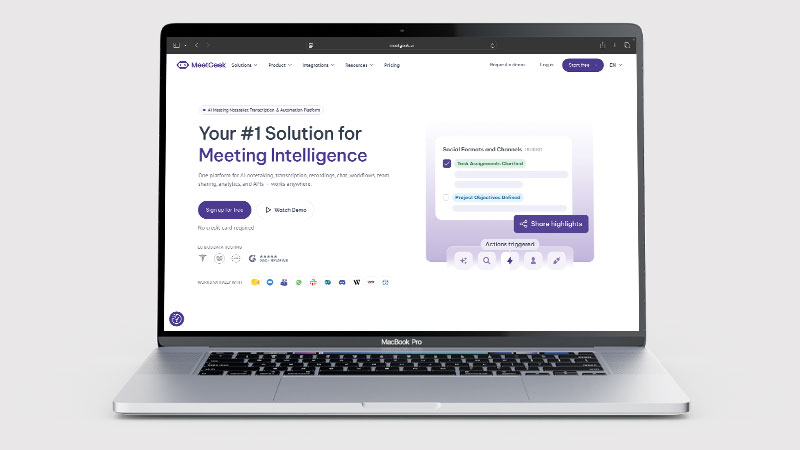
What makes MeetGeek worth considering alongside or instead of better-known tools is the highlight detection — it automatically identifies key moments in a meeting and surfaces them, so you can review the 30-second clips that mattered without listening to an hour of recording. Combined with strong integration support for Slack, Notion, HubSpot, and Salesforce, it fits naturally into how most teams already work.
What is MeetGeek?
MeetGeek is an AI meeting assistant that integrates with your calendar to automatically join and record scheduled meetings. It transcribes the audio with speaker identification, generates an AI summary with decisions and action items, detects and clips meeting highlights, and pushes all of this into integrations with your existing tools. The meeting library is searchable, so every recorded meeting becomes a retrievable knowledge asset rather than a forgotten audio file.
The platform also supports a 14-day free trial, and the free tier is more functional than many competitors — 3 hours of meeting storage per month is limited, but enough to experience the full workflow before committing to a paid plan. Setup takes minutes: connect your calendar, and MeetGeek joins meetings automatically from there.
What Can You Do With MeetGeek?
MeetGeek records and writes up meetings, and does it with the least friction of any tool in the category. Here is the range.
- Record and transcribe automatically — MeetGeek joins your calls and produces an accurate transcript with speaker identification.
- Surface the key moments — MeetGeek uses AI highlight detection to pull out what mattered without you scrubbing the recording.
- Write structured summaries — MeetGeek separates decisions from action items rather than producing one block of text.
- Send notes to your other tools — MeetGeek integrates with Slack, Notion, Google Drive and more.
- Push to your CRM — MeetGeek syncs with HubSpot and Salesforce, though that needs the Business plan.
- Search across past meetings — MeetGeek keeps a searchable library of everything it has recorded.
- Watch the storage cap — MeetGeek gives three hours a month free, which regular meeting users burn through quickly.
MeetGeek Pricing
| Plan | Price | Storage | Key features | Best For |
|---|---|---|---|---|
| Basic | Free | 3 hrs/month | Transcription, basic summaries | Evaluating the tool |
| Pro | $9.99/user/mo (annual) | 10 hrs/month | AI highlights, integrations, full summaries | Individuals and small teams |
| Business | $17/user/mo (annual) | Unlimited | CRM integrations, advanced analytics, team features | Growing teams |
| Enterprise | Custom | Unlimited | SSO, compliance, dedicated support | Large organisations |
The free tier’s 3 hours per month is a tight allocation for meeting-heavy roles, but enough to run a proper evaluation. Pro at $9.99/user/month (annual) is one of the most competitive prices in the AI meeting notes category. Business unlocks CRM integrations (HubSpot, Salesforce) and team management features. All paid plans include a 14-day free trial, so there is no risk in starting with the plan you think you will need.
MeetGeek Review: Pros and Cons
MeetGeek Pros
- Clean, intuitive interface — easier to navigate than most meeting note tools
- AI highlight detection surfaces key meeting moments automatically
- Accurate transcription with solid speaker identification
- Well-structured summaries with decisions and action items clearly separated
- Strong integration support: Slack, Notion, HubSpot, Salesforce, Zapier
- Competitive pricing starting at $9.99/user/mo (annual)
MeetGeek Cons
- Free tier storage (3 hrs/mo) is quickly consumed for regular meeting users
- CRM integrations (HubSpot, Salesforce) require Business plan ($17/user/mo)
- Less brand recognition than Fireflies.ai or Otter.ai
- Bot participant model may not be appropriate for all client relationships
- Transcription accuracy drops with multiple simultaneous speakers or poor audio
Who Is MeetGeek For?
MeetGeek is built for teams, managers, consultants, and anyone who spends significant time in meetings and wants automatic transcription, AI summaries, and action items without manual note-taking. If you attend multiple meetings per week and find that follow-up actions slip through the cracks, it removes the admin entirely. It is less suited to individuals who rarely meet with others or who prefer to keep their own notes.
Key Use Cases
Sales and client meetings. MeetGeek’s highlight detection is particularly valuable in sales contexts — automatically identifying moments where a prospect expressed interest, raised objections, or made commitments. Pair this with HubSpot or Salesforce integration (Business plan) and post-call admin becomes near-automatic: call summary, action items, and key clips pushed to the deal record without manual data entry.
Remote team collaboration. For distributed teams running frequent standups, planning sessions, and reviews, MeetGeek provides an automatic record of every discussion that async team members can catch up on quickly using the highlight clips rather than rewatching full recordings. Summaries pushed to Slack or Notion keep decisions visible in the right places.
Consultants and freelancers. For consultants who conduct regular client calls, MeetGeek provides automatic meeting documentation — a professional record of what was discussed and agreed, which protects both parties and reduces the need for lengthy follow-up emails. The searchable library means you can find any past conversation by topic or keyword.
What Are the Downsides of MeetGeek?
Like all meeting bot tools, MeetGeek requires you to inform meeting participants that the call is being recorded — this is a legal requirement in many jurisdictions and not optional. Some external clients may be uncomfortable with a visible AI participant in meetings, requiring you to manage the conversation proactively.
The 3-hour monthly storage limit on the free tier means it burns out quickly for anyone with a meeting-heavy schedule. A typical professional with 3–4 one-hour meetings per week will exceed the free allocation in the first week. Pro at $9.99/month is the realistic minimum for ongoing use.
How Does MeetGeek Compare to Fireflies.ai?
MeetGeek and Fireflies.ai are the two most directly comparable AI meeting assistants. Both do accurate transcription, structured summaries, and CRM integration. The differences are subtle but meaningful: MeetGeek has a cleaner UI and stronger highlight clipping; Fireflies.ai has a more established feature set and slightly deeper CRM integration history. Pricing is nearly identical. For most users, trying both on a 14-day trial and choosing based on the interface they prefer is the right approach. See our Fireflies.ai review for a full breakdown.
| Feature | MeetGeek | Fireflies.ai |
|---|---|---|
| Free tier storage | 3 hrs/month | 800 mins total |
| Starting price | $9.99/user/mo | $10/seat/mo |
| AI highlight clips | ✓ Strong | ✓ |
| CRM integrations | Business plan+ | Business plan+ |
| Interface quality | ✓ Very clean | Good |
| Best for | Clean UX, highlights-first workflow | CRM-heavy sales teams |
Is MeetGeek Good? Our Verdict
Yes — we scored MeetGeek 8.5/10. It is the most pleasant meeting notetaker to actually use, with a clean interface, reliable speaker identification and summaries that separate decisions from actions. The free tier is three hours a month, which regular users burn through quickly.
MeetGeek is a strong, well-rounded AI meeting assistant that punches above its weight given its pricing. The highlight detection is genuinely useful and better implemented than in most competitors, the interface is clean and easy to navigate from day one, and the pricing is competitive. At $9.99/user/month for Pro, it is one of the best-value meeting intelligence tools available.
It lacks some of the brand recognition of Fireflies.ai or Otter.ai, but that gap is closing. For anyone comparing AI meeting note tools, MeetGeek deserves serious consideration — especially for teams that want strong highlight clipping alongside standard transcription and summaries.
MeetGeek Review Rating: 8.5/10
Every tool we review is signed up for and tested by hand. See how we test and score.
Best for: Sales teams, remote teams, and consultants who want clean AI meeting notes with strong highlight detection and CRM integration at a competitive price point.
Not ideal for: Teams where recording consent is difficult to manage, or organisations with strict policies against AI bots in meetings.
MeetGeek Score Breakdown
| Output quality | 8.5/10 | Accurate transcription with solid speaker ID; drops on heavy accents |
| Ease of use | 9/10 | The cleanest interface in the meeting-notes category |
| Features | 8/10 | AI highlights, structured summaries and strong integrations; CRM needs Business |
| Value for money | 8/10 | Free tier is only three hours a month, which regular users burn quickly |
| Overall score | 8.5/10 | The most pleasant meeting notetaker to actually use day to day |
Frequently Asked Questions
Is MeetGeek worth it?
For regular meetings, yes. MeetGeek is pleasant enough to use daily and the summaries separate decisions from actions properly. The free tier is three hours a month, and CRM integration needs the $17 a user Business plan, so sales teams should budget for that.
Is MeetGeek free?
Yes — MeetGeek has a free Basic plan with 3 hours of meeting storage per month and basic transcription. This is enough to evaluate the tool but limited for ongoing professional use. All paid plans include a 14-day free trial, so you can start on the plan you intend to use without financial risk.
Does MeetGeek work with Google Meet?
Yes. MeetGeek supports Zoom, Google Meet, Microsoft Teams, Webex, and most major video conferencing platforms. It integrates with your calendar (Google Calendar or Outlook) to detect and automatically join scheduled meetings. No manual action is required once initial setup is complete.
Is MeetGeek GDPR compliant?
MeetGeek states GDPR compliance. For UK and EU businesses, ensure your own meeting recording consent practices meet local requirements — you must inform all participants that a meeting is being recorded. Enterprise plans include additional data processing agreements and compliance features for organisations with formal data governance requirements.
What are AI highlights in MeetGeek?
MeetGeek automatically detects key moments in your meeting — decisions made, action items assigned, important questions raised, or significant statements — and creates short video or audio clips of those moments. These highlights can be shared directly with colleagues or clients without needing to share the full recording, making async follow-up much more efficient.
Alternatives to MeetGeek
Fireflies.ai — The closest direct competitor with comparable features and pricing. Slightly more established with deeper CRM integration history. See our Fireflies.ai review for a head-to-head comparison.
Otter.ai — One of the original AI transcription tools. Strong for real-time transcription and meeting notes; less developed on highlight detection and CRM integration compared to MeetGeek.
Tl;dv — Focused on video recording and highlight clipping for async sharing. Good for teams that prioritise sharing meeting moments over full integration with CRM and project management tools.
More from WhatAITools: Castmagic review, Lindy review and MindStudio review.

James is an SEO and content specialist with over 12 years’ experience, and tests AI tools so everyday people don’t have to. WhatAITools.co.uk covers honest, no-jargon reviews to help you find the right tool for your needs.
Leave a Reply