
⚠️ Affiliate Disclosure: This post is not an affiliate associated review. It may become one in the future and this disclosure will reflect that. This does not affect my reviews and I only recommend tools I genuinely believe in.
This MindStudio review examines the no-code AI agent builder that lets non-developers create, deploy, and share custom AI tools without writing a line of code. We tested it across marketing, customer support, and data processing use cases to see whether the promise of “build an AI agent in minutes” holds up in practice. Here’s our honest verdict.
MindStudio Review
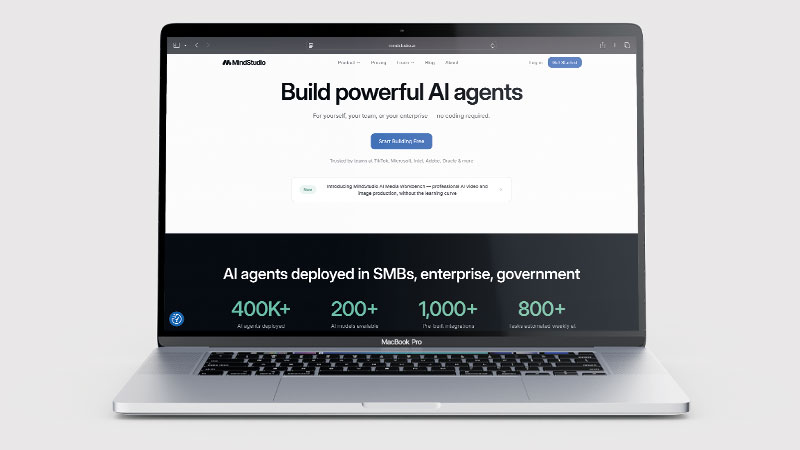
MindStudio sits at an interesting intersection: it is powerful enough to build genuinely useful AI agents, but accessible enough that you do not need a developer to use it. The visual workflow builder lets you chain AI model calls, connect to external data sources, apply logic and conditions, and deploy the result as a shareable URL or embeddable widget — all through a drag-and-drop interface. For teams that want to build custom AI tools without engineering resource, this is a compelling proposition.
The platform supports multiple AI models (GPT-4, Claude, Gemini) within a single agent, 1,000+ integrations via direct connections and API, and a free tier that includes everything you need to build and test. Usage costs are charged separately on top of subscription fees — a pricing model worth understanding before committing.
What is MindStudio?
MindStudio is a no-code platform for building AI agents — automated workflows where AI models are the processing engine rather than just an add-on feature. An agent in MindStudio can take an input (a URL, a document, a form submission, a webhook), pass it through a sequence of AI model calls and logic steps, connect to external services, and produce an output — a generated document, a categorised result, a sent email, or a record added to a CRM.
Built agents can be deployed as standalone web apps with their own URLs, embedded in existing websites, or accessed via API. This means a marketing team can build a content brief generator, an e-commerce team can build a product description writer, and a support team can build a ticket categorisation agent — each without any developer involvement.
What Can You Do With MindStudio?
MindStudio is for building AI agents without writing code. Here is what you can build with it.
- Build a working AI agent in hours — MindStudio is genuinely no-code, so non-developers can ship something usable.
- Mix models in one agent — MindStudio supports GPT, Claude, Gemini and others inside a single workflow.
- Connect to your data — MindStudio offers over 1,000 integrations for pulling in external services.
- Publish agents for others to use — MindStudio lets you share an agent with a team or embed it.
- Automate multi-step tasks — MindStudio chains prompts, logic and tools into a single process.
- Budget for usage on top — MindStudio charges model usage separately from the subscription, so the total bill is hard to predict.
MindStudio Pricing
| Plan | Base cost | Usage costs | Agents | Best For |
|---|---|---|---|---|
| Free | $0/mo | Per model call | 1 agent, 1,000 runs/mo | Building and testing |
| Individual | $20/mo | Per model call | Unlimited agents and runs | Solo builders and power users |
| Teams | Custom | Custom | Unlimited | Organisations and agencies |
The important nuance with MindStudio pricing is that usage costs — the cost of AI model calls your agents make — are charged separately on top of the subscription fee. The base subscription covers access to the platform; you pay additionally for the AI processing your agents consume. For agents that run frequently or use expensive models (GPT-4, Claude Opus), these usage costs can add up. Budget for both the subscription and estimated usage when evaluating total cost.
MindStudio Review: Pros and Cons
MindStudio Pros
- Genuinely no-code — non-developers can build working AI agents in hours, not weeks
- Multi-model support: use GPT-4, Claude, Gemini, and others within one agent
- 1,000+ integrations for connecting agents to external services and data
- Agents deploy as web apps, embeds, or APIs — flexible deployment without dev work
- Free tier allows building and testing one agent — enough to assess the platform
- Active development community and template library to build from
MindStudio Cons
- Usage costs on top of subscription make total price unpredictable without usage estimates
- Teams plan pricing is not publicly available — requires sales conversation
- Learning curve for complex agents — simple ones are fast, multi-step logic takes time to learn
- Still a relatively niche platform — smaller community than Make.com or Zapier
- Debugging complex agent failures requires patience and structured testing
Who Is MindStudio For?
MindStudio is designed for non-technical business owners, operations teams, and product managers who want to build and deploy custom AI agents without writing code. If you have a specific internal workflow that could benefit from AI automation and no engineering resource to build it, MindStudio fills that gap. It is less suited to developers who would prefer to build agents programmatically with full control.
Key Use Cases
Marketing content tools. Marketing teams build MindStudio agents that take a brief or URL as input and produce a structured content output — blog outlines, social media posts, ad copy, email sequences — in their specific brand voice and format. These agents can be deployed as internal tools accessible to the whole team, removing the need to re-prompt ChatGPT manually each time and ensuring consistent output format.
Customer support automation. Support teams build ticket classification, FAQ answer generation, and escalation routing agents. An incoming support ticket is categorised, matched against a knowledge base, and either answered automatically or routed to the right team — without a developer building a custom integration or an agent spending time on repetitive queries.
Data processing and enrichment. Revenue operations and data teams build agents that take raw data inputs — a company URL, a lead form submission, a spreadsheet row — and enrich them: pull company data, generate a summary, score a lead, write a personalised email. These processes run in the background or on demand without manual work.
What Are the Downsides of MindStudio?
MindStudio is no-code, but it is not no-thought. Building a genuinely useful agent requires understanding the logic of what you want it to do — how to structure prompts, how to handle edge cases, how to chain steps appropriately. The visual builder makes this easier than code, but users who go in expecting to click a few buttons and have a sophisticated agent working immediately will need to invest more time than expected.
The usage-on-top-of-subscription pricing model requires active monitoring. A high-volume agent running on GPT-4 can generate substantial usage costs quickly. Set usage alerts and estimate costs for each agent’s expected run volume before deploying to production.
How Does MindStudio Compare to Make.com?
Make.com is a general-purpose automation platform that connects apps and automates workflows. MindStudio is an AI-agent builder — its automations are centred on AI model calls processing data rather than connecting web services. Make.com is better for integrating dozens of SaaS apps in a data pipeline; MindStudio is better for building AI-native workflows where a model is doing the heavy lifting. The two are increasingly complementary: many advanced users use Make.com to trigger and route data, and MindStudio to do the AI processing. See our Make.com review for context on the broader automation landscape.
| Feature | MindStudio | Make.com |
|---|---|---|
| Free plan | ✓ 1 agent, 1,000 runs/mo | ✓ 1,000 ops/mo |
| Starting price | $20/mo + usage | ~£9/mo |
| AI-native workflows | ✓ Core focus | Limited |
| App integrations | 1,000+ | 1,500+ |
| Multi-model support | ✓ GPT-4, Claude, Gemini | Via AI modules |
| Best for | AI agent building | General app automation |
Is MindStudio Good? Our Verdict
Yes — we scored MindStudio 8.5/10. It is genuinely no-code, so a non-developer can build a working AI agent in hours, and you can mix GPT, Claude and Gemini inside one workflow. Usage costs sit on top of the subscription, which makes the real monthly bill hard to predict.
MindStudio is one of the most accessible routes into AI agent building for non-developers. The visual interface genuinely works for building useful agents without code, the multi-model support is a real differentiator, and the deployment flexibility (web app, embed, API) means agents can be put in front of the people who need them without IT involvement.
The usage-on-top-of-subscription pricing requires careful monitoring at scale, and the Teams pricing opacity is frustrating for organisations trying to budget. But as a platform for product teams, marketing teams, and operations teams who want to build AI tools for their specific workflows, MindStudio is genuinely impressive.
MindStudio Review Rating: 8.5/10
Every tool we review is signed up for and tested by hand. See how we test and score.
Best for: Non-developer teams who want to build, deploy, and share custom AI agents for specific business workflows without engineering resource.
Not ideal for: Teams needing predictable flat-rate pricing, or general workflow automation without AI as the central component — use Make.com or Zapier for those.
MindStudio Score Breakdown
| Output quality | 8.5/10 | Agents perform well once configured properly |
| Ease of use | 7.5/10 | Simple agents are quick; complex ones have a real learning curve |
| Features | 9/10 | Genuinely powerful agent building with wide model support |
| Value for money | 7.5/10 | Usage costs sit on top of the subscription, so the true bill is hard to predict |
| Overall score | 8.5/10 | Powerful agent building, with pricing you cannot forecast in advance |
Frequently Asked Questions
Is MindStudio worth it?
If you will build several agents, yes. MindStudio lets a non-developer ship a working agent in hours, which is worth real money against development time. Budget carefully: model usage is charged on top of the subscription, so the monthly total is hard to predict.
Is MindStudio truly no-code?
Yes — MindStudio is built for non-developers and does not require any coding to build or deploy agents. The visual workflow builder uses a drag-and-drop interface to chain steps, set conditions, and define AI model calls. However, building sophisticated agents still requires logical thinking about how you want the agent to process data — it is no-code, not no-skill.
What AI models does MindStudio support?
MindStudio supports GPT-4 and GPT-4o (OpenAI), Claude 3 and Claude 4 family (Anthropic), Gemini (Google), and a range of other models. You can use different models for different steps within the same agent — for example, using a faster, cheaper model for initial classification and a more powerful model for final generation. Model selection affects both quality and usage cost.
How are usage costs calculated in MindStudio?
Usage costs in MindStudio are based on the AI model calls your agents make — essentially the token costs of the underlying model (GPT-4, Claude, etc.) plus MindStudio’s platform margin. A simple agent making one GPT-3.5-turbo call per run is cheap; a complex agent making multiple GPT-4 calls on long documents is more expensive. MindStudio provides usage dashboards so you can monitor costs and set alerts before overages become significant.
Can MindStudio agents be shared with people outside my organisation?
Yes. Agents can be deployed as public web apps with shareable URLs, meaning anyone can access and use the agent through a browser without a MindStudio account. This makes it practical to deploy internal tools to teams, client-facing tools to external users, or embed agents in websites — all without the end user needing to interact with MindStudio directly.
Alternatives to MindStudio AI
Enjoy our MindStudio AI review? Need more ideas of what other ai tool to use? Have a look below at similar tools to MindStudio AI
Make.com — A broader automation platform for connecting apps and services. Better for general workflow automation; less focused on AI-native agent building. See our Make.com review.
Activepieces — An open-source automation platform with native AI agent support. Better if you want self-hosting, unlimited runs, and open-source flexibility. See our Activepieces review.
Zapier — The leading no-code automation platform for connecting apps. More beginner-friendly and has a larger app library; less AI-native than MindStudio for agent-specific workflows.

James is an SEO and content specialist with over 12 years’ experience, and tests AI tools so everyday people don’t have to. WhatAITools.co.uk covers honest, no-jargon reviews to help you find the right tool for your needs.
Leave a Reply