⚠️ Affiliate Disclosure: This post is not an affiliate associated review. It may become one in the future and this disclosure will reflect that. This does not affect my reviews and I only recommend tools I genuinely believe in.
This Otter.ai review covers the best-known AI meeting assistant — the one that turns your Zoom, Teams and Google Meet calls into searchable transcripts, summaries and action items. We look at what the free plan actually gives you, where the limits bite, and whether it still leads a category that has become very crowded.
Otter.ai Review
Otter.ai has been transcribing meetings since before most people had heard of AI note-takers, and that head start shows. It is the tool people name first, and the one your colleagues have probably already installed.
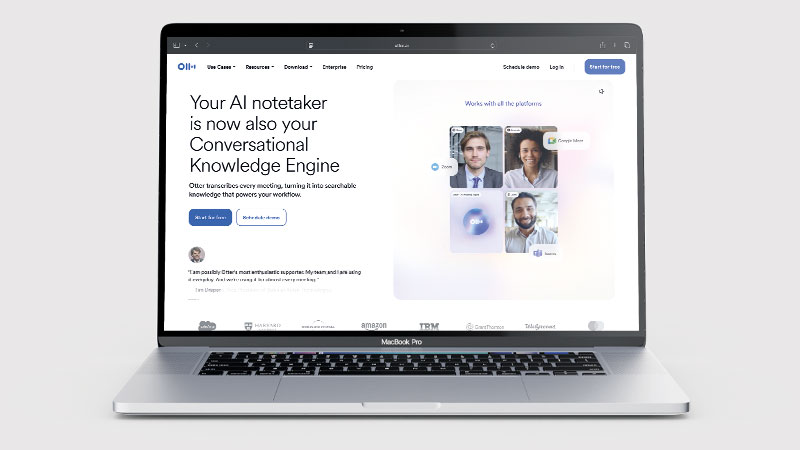
That familiarity is worth something. Otter is polished, it joins calls reliably, and the transcript quality on clear English audio is very good. The question in 2026 is whether the free plan is generous enough to be useful, and whether newer rivals have overtaken it on the things that matter after the transcript.
What is Otter.ai?
Otter.ai records and transcribes meetings in real time. A bot joins your call, produces a live transcript you can follow as people speak, and afterwards gives you a summary, action items and a searchable record.
It integrates with Zoom, Microsoft Teams and Google Meet, syncs with your calendar so it joins scheduled calls automatically, and includes an AI chat feature that lets you ask questions about what was said.
What Can You Do With Otter.ai?
- Otter.ai joins your meetings automatically — the Otter Assistant connects to Zoom, Microsoft Teams and Google Meet, and records without you starting anything
- Live transcription with captions — text appears as people speak, with live captions in Zoom and Google Meet
- Speaker identification — labels who said what, and learns names over time
- Automatic summaries — summary keywords and an overview so you can skip the full transcript
- Searchable archive — find any moment by keyword, speaker or date across every meeting you have recorded
- Synced audio playback — click any line of text to jump to that point in the recording, with speed control
- Import existing recordings — upload pre-recorded audio or video files for transcription
- Custom vocabulary — teach it names, jargon and product terms it would otherwise mishear
- Calendar integration — connects to Google Calendar, Outlook and iOS Calendar so it knows what is coming up
- Export and share — export audio, text and captions, or share via links and groups
Otter.ai Pricing
| Plan | Price | Transcription | Notes |
|---|---|---|---|
| Basic | Free | 300 mins/month | 30 mins per conversation, 3 lifetime file imports, 20 AI chat queries |
| Pro | $8.33/mo annual ($16.99 monthly) | 1,200 mins/month | Higher per-conversation limits, more imports |
| Business | $19.99/user/mo annual ($30 monthly) | Unlimited meetings | Up to 6,000 imported-file minutes per user |
| Enterprise | Custom | Unlimited | Admin controls, SSO, advanced security |
The free plan is real but tightly drawn. 300 minutes a month sounds workable until you notice the 30-minute cap per conversation — most useful meetings run longer, and Otter will stop transcribing mid-sentence.
The detail that catches people out is file imports: three lifetime imports, not three per month. If you planned to upload existing recordings, the free plan is not for you.
Otter.ai Review: Pros and Cons
Otter.ai Pros
- Otter.ai delivers excellent transcription accuracy on clear English audio
- Real-time transcript you can read as the meeting happens
- Joins Zoom, Teams and Google Meet automatically via calendar sync
- Mature, stable product — it rarely fails to show up
- Genuinely free tier with no card required
- AI chat lets you interrogate the transcript afterwards
Otter.ai Cons
- Otter.ai caps free conversations at 30 minutes
- Only three file imports on the free plan — ever, not monthly
- Accuracy drops noticeably with strong accents and crosstalk
- Monthly pricing is nearly double the advertised annual rate
- Summaries are competent but less actionable than newer rivals
- Video recording is weaker than tools built around it
Who Is Otter.ai For?
Otter suits people who mainly need an accurate written record: journalists, researchers, students, consultants and anyone who refers back to what was said rather than acting on it immediately.
It suits teams already standardised on it, where the network effect of shared transcripts matters more than any individual feature.
It suits less well if your priority is polished summaries pushed into a CRM, or if your meetings are longer than half an hour and you want to stay on the free plan.
Key Use Cases
- Interview transcription — journalists and researchers capturing quotes accurately
- Meeting records — a searchable archive of what was decided and by whom
- Accessibility — live captions for participants who need them
- Lecture and training notes — students and L&D teams capturing sessions
- Follow-up — extracting action items without writing notes during the call
What Are the Downsides of Otter.ai?
Transcription accuracy is very good rather than perfect. Strong regional accents, several people talking at once, and poor microphones all degrade it, and Otter does not always flag where it is guessing.
The bigger limitation is what happens after the transcript. Otter gives you a solid record; tools like Fireflies and MeetGeek push harder on turning that record into CRM entries, coaching insight and automated follow-up. If the transcript is the destination, Otter is excellent. If it is the starting point, look further.
How Does Otter.ai Compare to Fireflies.ai?
| Otter.ai | Fireflies.ai | |
|---|---|---|
| Free tier | 300 mins/month, 30 min cap | More generous recording limits |
| Transcript quality | Excellent | Very good |
| Real-time transcript | Yes | Limited |
| CRM integration | Basic | Stronger |
| Entry paid plan | $8.33/mo annual | Comparable |
| Best for | An accurate written record | Sales and CRM workflows |
Both are strong. The honest split is that Otter is the better transcriber and Fireflies is the better workflow tool. See our Fireflies.ai review for the other side of that comparison.
Is Otter.ai Good? Our Verdict
Yes, if you want the transcript — we scored Otter.ai 7.5/10. Accuracy on clear English is best in class and the real-time transcript is still something few rivals match. Newer tools do more with the transcript once they have it, and the free plan caps conversations at 30 minutes.
Otter.ai remains the most reliable AI transcription tool for everyday meetings, and the real-time transcript is still something few rivals match. If you want to know exactly what was said, it is hard to beat.
What has changed is the competition around it. Newer tools do more with the transcript once they have it, and several offer more generous free plans. Otter feels like a product that got the hard part right early and has been incrementally improving while others reframed the problem.
The 30-minute free cap and three-lifetime-imports limit are the two things most likely to frustrate you. Know about them before you sign up rather than halfway through a long call.
Otter.ai Review Rating: 7.5/10
Every tool we review is signed up for and tested by hand. See how we test and score.
Best for: Anyone who needs an accurate, searchable written record of meetings, interviews or lectures.
Not ideal for: Sales teams wanting deep CRM automation, or anyone hoping to run long meetings on the free plan.
Otter.ai Score Breakdown
| Output quality | 8/10 | Best-in-class on clear English; accuracy slips with strong accents and crosstalk |
| Ease of use | 8.5/10 | Calendar sync, reliable joining and a live transcript you can read as it happens |
| Features | 7.5/10 | AI chat and summaries are solid, but newer rivals do more with the transcript |
| Value for money | 6.5/10 | Free tier is real but tightly capped, and monthly pricing is nearly double the annual rate |
| Overall score | 7.5/10 | The dependable choice when the transcript itself is what you need |
Frequently Asked Questions
Is Otter.ai worth it?
If you need the transcript rather than the summary, yes. Otter.ai is $8.33 a month on annual billing and accuracy on clear English is the best available. Note that monthly pricing is nearly double the annual rate, and the free plan caps conversations at 30 minutes.
Is Otter.ai free?
Yes. The Basic plan gives you 300 transcription minutes a month with no credit card, but caps each conversation at 30 minutes and allows only three file imports for the lifetime of the account.
How accurate is Otter.ai?
Very accurate on clear English audio with one speaker at a time. Accuracy falls with strong accents, overlapping speech and poor microphones — as it does for every tool in this category.
Does Otter.ai work with Zoom, Teams and Google Meet?
Yes, all three. Connecting your calendar lets Otter join scheduled meetings automatically.
What is the difference between Otter Pro and Business?
Pro gives 1,200 minutes a month for one user. Business adds unlimited meeting transcription, up to 6,000 imported-file minutes per user, and team admin features.
Alternatives to Otter.ai
Fireflies.ai — Stronger on CRM integration and turning conversations into workflow actions. See our Fireflies.ai review.
MeetGeek — Slicker summaries and a more generous free tier, aimed at teams that want the output rather than the transcript. See our MeetGeek review.
Castmagic — Built for turning recorded audio into publishable content rather than meeting notes. See our Castmagic review.
More from WhatAITools: Fireflies.ai review, MeetGeek review and Lindy review.

James is an SEO and content specialist with over 12 years’ experience, and tests AI tools so everyday people don’t have to. WhatAITools.co.uk covers honest, no-jargon reviews to help you find the right tool for your needs.
>
Leave a Reply