⚠️ Affiliate Disclosure: This post is not an affiliate associated review. It may become one in the future and this disclosure will reflect that. This does not affect my reviews and I only recommend tools I genuinely believe in.
This Reclaim.ai review examines the AI calendar tool that automatically schedules your work, defends your focus time, and prevents meeting overload — all without you having to manage your calendar manually. We tested it across a real work schedule to see whether the automation actually holds up and whether the productivity gains are as significant as claimed. Here’s our honest verdict.
Reclaim.ai Review
Reclaim.ai takes a different approach to calendar management. Rather than helping you schedule things faster, it removes you from the scheduling process almost entirely. Connect it to your Google Calendar, tell it about your habits and tasks, and it automatically finds the best time for everything — protecting focus blocks, fitting in meetings, and adjusting dynamically when plans change. The result is a calendar that reflects actual priorities rather than whoever managed to book time with you first.
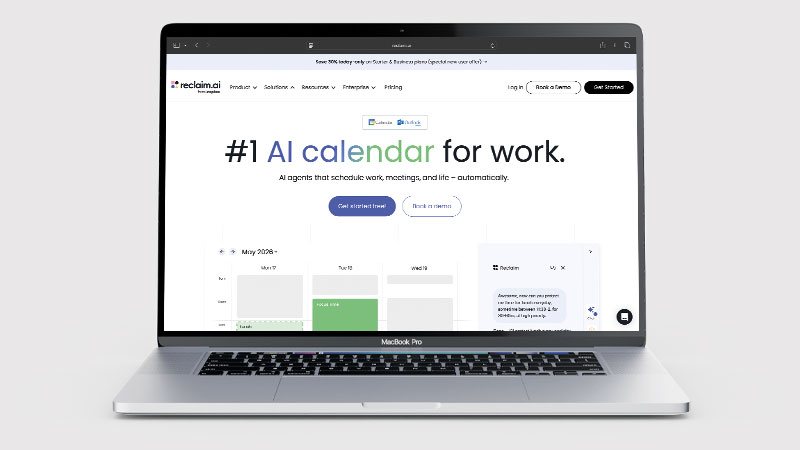
For knowledge workers who spend significant time in meetings, constantly have their focus time fragmented, or find themselves working evenings to compensate for disrupted workdays, Reclaim.ai offers a genuinely different approach to the problem. The AI is not just automating scheduling — it is optimising your schedule around declared priorities.
What is Reclaim.ai?
Reclaim.ai is an AI scheduling assistant that integrates with Google Calendar to automatically manage your time. You set up priorities — this task needs 4 hours this week, I want 2 hours of focus time every morning, I prefer not to meet before 10am — and Reclaim handles the rest. It blocks time for deep work, schedules recurring habits, fits tasks into available slots, and adjusts when meetings are added or cancelled. The calendar becomes self-managing rather than something you have to actively curate.
Reclaim also includes a scheduling link (similar to Calendly) that offers meeting slots within the parameters you have defined — which means booked meetings automatically respect your focus time and working preferences. For teams, it can coordinate scheduling across multiple people, finding times that work for everyone’s declared priorities, not just empty calendar slots.
What Can You Do With Reclaim.ai?
Reclaim.ai is a scheduling assistant that rearranges your calendar for you. Here is what it actually manages.
- Defend your focus time — Reclaim.ai blocks deep work in your calendar and stops meetings quietly eating it.
- Schedule habits that actually happen — Reclaim.ai finds room for exercise, writing or a weekly review and moves them when the week changes.
- Offer booking links that respect priorities — Reclaim.ai only offers slots that do not damage your important work, rather than any gap.
- Reshuffle automatically — Reclaim.ai reorganises tasks and habits in the background as your calendar shifts.
- Add buffer around meetings — Reclaim.ai builds in travel and decompression time so days do not run back to back.
- Sync tasks from your other tools — Reclaim.ai pulls in work from task managers and finds time for it.
- Google Calendar only — Reclaim.ai does not support Microsoft Outlook, which rules it out for a lot of workplaces.
Reclaim.ai Pricing
| Plan | Price | Features | Best For |
|---|---|---|---|
| Lite | Free | 5 AI scheduling agents, basic habits, scheduling links | Trying the tool |
| Starter | $10/seat/mo (annual) | Unlimited agents, full habits, task integration | Individuals and small teams |
| Business | $15/seat/mo (annual) | Team scheduling, analytics, priority support | Teams needing coordinated scheduling |
The free Lite plan is genuinely functional — 5 AI scheduling agents covers the core use cases for most individuals (a few tasks, a couple of habits, a scheduling link). Starter at $10/month removes those limits and is the right choice for anyone using Reclaim regularly. Business adds team coordination features and analytics, useful for managers or teams wanting to see where time is actually going. Annual billing on both paid plans saves approximately 20%.
Reclaim.ai Review: Pros and Cons
Reclaim.ai Pros
- Automatically defends focus time — meetings cannot easily overrun your deep work blocks
- Habit scheduling ensures regular commitments (exercise, team sync, writing) actually happen
- Scheduling links respect your priorities, not just calendar gaps
- Works in the background without ongoing manual management
- Free Lite plan is usable for real productivity improvements
- Dynamic rescheduling adjusts automatically when plans change
Reclaim.ai Cons
- Google Calendar only — no Microsoft Outlook integration (major limitation for many users)
- Initial setup requires time to define priorities and preferences accurately
- Value diminishes if your schedule is controlled externally (e.g., executive assistant managed)
- Some features require Starter or Business plan to unlock full utility
- Learning period before the AI optimises well to your patterns
Who Is Reclaim.ai For?
Reclaim.ai is built for professionals and knowledge workers who want AI to automatically schedule tasks, focus blocks, and meetings around their existing calendar commitments. If you manage a complex calendar with competing priorities and regularly find that important work gets squeezed out, Reclaim solves that problem systematically. It is less suited to freelancers or users with simple, predictable schedules who do not need intelligent time allocation.
Key Use Cases
Protecting deep work time. The core use case for most users. Knowledge workers in roles that require sustained concentration — developers, writers, researchers, analysts — often find their workday fragmented by back-to-back meetings booked into every available slot. Reclaim automatically blocks focus time and keeps it defended, even as other calendar events shift around it.
Habit and routine scheduling. Regular commitments that are important but not urgent — daily exercise, weekly planning sessions, reading time, 1-on-1s — tend to get bumped when schedules get busy. Reclaim treats habits like appointments with negotiable but bounded timing, fitting them into available windows rather than losing them when meetings expand.
Task-driven scheduling. Connecting Reclaim to a task manager (it integrates with Asana, Todoist, Linear, and others) allows it to automatically schedule time for specific tasks based on their deadlines and priority. Rather than having a to-do list and a calendar that do not talk to each other, Reclaim creates time-blocked plans from your tasks automatically.
What Are the Downsides of Reclaim.ai?
The Google Calendar requirement is a significant limitation for many professionals and organisations. Microsoft 365 / Outlook users are not supported, which rules out a large proportion of corporate users. Reclaim has indicated Outlook support is on the roadmap, but as of mid-2026 it remains Google-only. If your organisation runs on Microsoft, Reclaim is not currently an option.
Reclaim works best when you have meaningful control over your own calendar. If your meetings are largely dictated by others — you are an executive assistant managing someone else’s calendar, or in a role where your time is essentially allocated by external demand — the benefits of AI scheduling optimisation are reduced. The tool rewards autonomy over your time.
How Does Reclaim.ai Compare to Calendly?
Calendly and Reclaim.ai serve related but different needs. Calendly is a scheduling link tool — it lets others book time with you based on your available slots. Reclaim is a calendar optimisation tool — it manages how your time is allocated across competing demands including meetings, tasks, habits, and focus time. Calendly does not manage your calendar; it just makes booking time with you easier. Reclaim actively manages your entire schedule. Many users benefit from both: Reclaim to define when and how your time is available, and scheduling links (Reclaim includes these) to let others book into those defined windows.
| Feature | Reclaim.ai | Calendly |
|---|---|---|
| Free plan | ✓ Lite (5 agents) | ✓ Basic |
| Starting price | $10/seat/mo (annual) | $10/seat/mo (annual) |
| AI calendar management | ✓ Full optimisation | ✗ |
| Scheduling links | ✓ | ✓ Core feature |
| Habit scheduling | ✓ | ✗ |
| Best for | Calendar optimisation & focus protection | Easy meeting booking links |
Is Reclaim.ai Good? Our Verdict
Yes — we scored Reclaim.ai 9/10. It defends focus time properly, schedules habits so they actually happen, and runs in the background once configured. The catch is absolute: Google Calendar only, with no Microsoft Outlook support.
Reclaim.ai is one of the most genuinely useful productivity tools available for Google Calendar users who feel their schedule is not reflecting their actual priorities. The automation — defending focus time, scheduling habits, fitting in tasks — works well once set up, and the dynamic rescheduling means it adapts to the inevitable changes in a real workweek rather than breaking when a meeting gets cancelled.
The Google-only constraint is a real limitation for many users, and the initial setup requires thoughtful configuration to work well. But for knowledge workers with autonomy over their schedules who want to spend less time managing their calendar and more time doing actual work, Reclaim.ai delivers on its promise.
Reclaim.ai Review Rating: 9/10
Every tool we review is signed up for and tested by hand. See how we test and score.
Best for: Knowledge workers on Google Calendar who want AI to automatically protect focus time, schedule habits, and optimise their week around real priorities.
Not ideal for: Microsoft Outlook users, or professionals whose schedules are primarily dictated by external demands rather than personal priority-setting.
Reclaim.ai Score Breakdown
| Output quality | 9/10 | Scheduling decisions are sensible and it defends focus time properly |
| Ease of use | 8.5/10 | Runs in the background once configured, but initial setup takes real thought |
| Features | 9/10 | Habits, smart meetings, priority-aware booking links and buffer time |
| Value for money | 8.5/10 | Generous free plan; some features need Starter or Business |
| Overall score | 9/10 | Excellent automated scheduling, provided you live in Google Calendar |
Frequently Asked Questions
Is Reclaim.ai worth it?
If you live in Google Calendar, yes. Reclaim.ai has a generous free plan and defends focus time in a way that pays back within a week for anyone in constant meetings. It is worth nothing to you if your organisation runs on Outlook, which it does not support.
Does Reclaim.ai work with Microsoft Outlook?
Not currently. Reclaim.ai supports Google Calendar only. Microsoft Outlook / Office 365 calendar integration has been on the roadmap but is not available as of mid-2026. If your organisation uses Outlook, Reclaim is not currently compatible — consider Motion or Clockwise as alternatives.
Is Reclaim.ai free?
Yes — the Lite plan is free and includes 5 AI scheduling agents, basic habit scheduling, and scheduling links. This is enough to experience the core workflow and evaluate whether Reclaim works for your schedule. Starter at $10/month (annual) removes agent limits and unlocks the full feature set for ongoing use.
What is an AI scheduling agent in Reclaim?
Reclaim calls each schedulable item — a task, a habit, a focus block — an “agent.” An agent is a set of rules about when and how something should be scheduled: this task needs 3 hours this week, prefer morning, not before 9am, deadline Friday. Reclaim then automatically finds the optimal time for each agent in your calendar. The Lite plan supports 5 agents; paid plans remove this limit.
What task managers does Reclaim integrate with?
Reclaim integrates with Asana, Todoist, Linear, and ClickUp, pulling tasks from these tools and automatically scheduling time for them in your calendar based on priority and deadlines. This is particularly powerful for developers and project managers who work from a task backlog — Reclaim converts the to-do list into scheduled time blocks automatically.
Alternatives to Reclaim.ai
Motion — An AI calendar and task manager that combines project management with automatic scheduling. More powerful for task management; more expensive at $19/month. Worth comparing if you want task management and scheduling in one tool.
Clockwise — Another AI calendar tool focused on protecting focus time and optimising meeting scheduling for teams. Supports both Google Calendar and Microsoft Outlook, which makes it the better option for Outlook users.
Calendly — The leading scheduling link tool. Better than Reclaim specifically for external meeting booking; does not manage your calendar’s internal scheduling the way Reclaim does.
More from WhatAITools: MindStudio review, Lindy review and Native.no review.

James is an SEO and content specialist with over 12 years’ experience, and tests AI tools so everyday people don’t have to. WhatAITools.co.uk covers honest, no-jargon reviews to help you find the right tool for your needs.
Leave a Reply