⚠️ Affiliate Disclosure: This post is not an affiliate associated review. It may become one in the future and this disclosure will reflect that. This does not affect my reviews and I only recommend tools I genuinely believe in.
Novelcrafter Review
This Novelcrafter review covers the AI-powered novel writing app designed to help authors plan, draft, and organise their stories. I tested it hands-on with the opening of my own vampire novel: building a Codex, connecting an AI model and drafting new scenes with it.
Novelcrafter is the most powerful AI-assisted writing platform available for serious fiction authors — and also the most complex. It has everything an indie author could want: a structured world-building system, AI integration across hundreds of models, and scene-level planning tools. But it takes real effort to set up and learn. This review helps you decide whether that effort is worth it.
What is Novelcrafter?
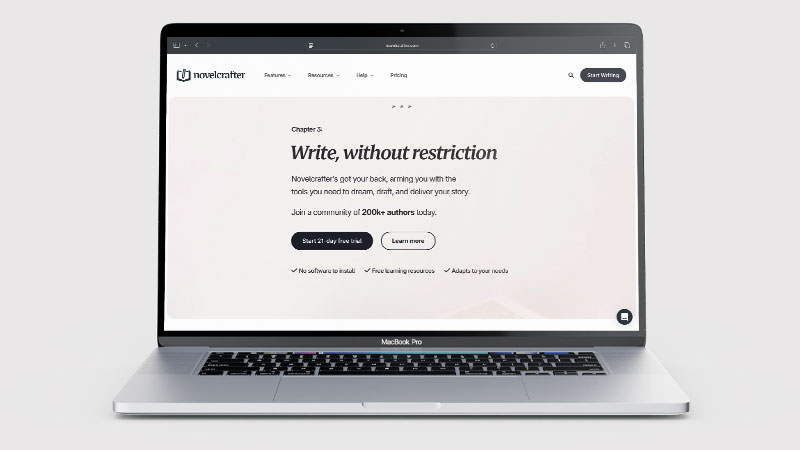
Novelcrafter is a browser-based writing studio built for novelists and indie authors who want to manage entire book projects — not just generate text. It provides a structured environment for worldbuilding, character development, plot planning, and chapter drafting, with AI assistance woven throughout the workflow.
What makes it unusual is its “bring your own key” (BYOK) model. Rather than using a single built-in AI, Novelcrafter lets you connect whichever AI model you prefer — GPT-4, Claude, Gemini, Llama, or even a local model — using your own API key. This means you pay the AI provider directly and aren’t locked into one model or one cost structure. Over 300 models are supported.
What Can You Do With Novelcrafter?
- Build a Codex — Novelcrafter’s structured reference library stores your characters, locations, world rules, plot points and relationships.
- Keep the AI consistent — the AI references your Codex when generating or suggesting content, so it sticks to your established story.
- Manage chapters and scenes — grid and matrix views for organising the whole book.
- Draft and summarise scenes — AI-powered scene drafting and summarisation.
- Detect characters and generate beats — Novelcrafter spots characters in your text and generates story beats.
- Write a whole novel — designed to take a book from concept to completed draft, not just help with isolated passages.
Novelcrafter Pricing
Novelcrafter has four subscription tiers. Note that AI usage costs are separate — you pay the AI provider (e.g. OpenAI or Anthropic) directly via your own API key, typically an additional £4–16/month depending on usage.
| Plan | UK price (incl. 20% VAT) | What’s included |
|---|---|---|
| Scribe | £3.59/month incl. VAT (£35.88/year) | Basic writing tools, no AI integration |
| Hobbyist | £7.18/month incl. VAT (£71.76/year) | AI integration via your own API key |
| Artisan | £12.55/month incl. VAT (£125.58/year) | Full AI chat features and advanced review tools |
| Specialist | £17.94/month incl. VAT (£179.39/year) | Collaboration and team features |
A 21-day free trial is available with no credit card required — one of the more generous trials in this category. Novelcrafter localises its pricing, so UK visitors see GBP with VAT included; the equivalent USD list prices are $4, $8, $14 and $20. Paying yearly gets you two months free. The true monthly cost for most active users will be the Artisan plan (£12.55 incl. VAT) plus AI API costs, putting the real-world price at roughly £17–29/month. There is no free plan, but if you cancel you keep read-only access and can still export your work. I checked these prices on novelcrafter.com on 22 October 2026.
Novelcrafter Review: Pros and Cons
Novelcrafter Pros
- Novelcrafter’s Codex keeps the AI consistent with your story world
- Codex found every mention of my main character automatically
- BYOK flexibility — use any AI model you choose
- Handles full novel projects from outline to completed draft
- 21-day free trial, no credit card required
- Used by 157,000+ authors with strong community
Novelcrafter Cons
- Novelcrafter has a steep learning curve — it takes time to set up properly
- No AI included — you need your own account with an AI company
- Defaults to AI models you may not have connected
- Requires API keys — not beginner-friendly
- Additional AI costs on top of subscription
- Browser-based only — no desktop or mobile app
- Can feel overwhelming for casual writers
Who Is Novelcrafter For?
Novelcrafter is built for dedicated fiction writers who want a structured, distraction-free writing environment with built-in AI assistance and project management for long-form work. If you are writing a novel and want your world-building notes, character profiles, and manuscript all in one place with AI that references your own material, it is well-designed for that workflow. It is overkill for short-form writers or casual users who just want quick AI drafting.
Key Use Cases
Managing complex novels with large casts and worlds. The Codex is genuinely valuable for fantasy, sci-fi, or any genre with deep worldbuilding. Instead of keeping character details and world rules in separate documents, everything is stored in one structured reference the AI can draw on.
Scene planning and structure. The matrix view lets you see your entire novel laid out by chapters and scenes, which is helpful for spotting pacing issues, tracking subplots, and planning what needs to happen before you write it.
Writing longer novels at scale. Novelcrafter is built for book-length projects. If you’re writing 80,000+ word novels, the project management features justify the setup time far more than for short stories or novellas.
Choosing your own AI model. The BYOK system is a genuine advantage for writers who have a preferred AI model or want to control their costs. Using a cheaper model like GPT-4o Mini keeps AI costs low; switching to Claude Opus gives you the best prose quality when needed.
What Are the Downsides of Novelcrafter?
The setup is significant. Getting the most out of Novelcrafter requires building your Codex before you start writing — entering characters, world details, and story notes. For writers who want to start immediately, this upfront investment can feel like a barrier.
API keys are required for AI features. To use AI generation, you need to set up an account with an AI provider (OpenAI, Anthropic, etc.) and obtain an API key. This is not difficult, but it’s an extra step that casual users or beginners may find off-putting.
There is no AI in the box. On the trial and on every plan, the AI features need your own account with an AI company, and Novelcrafter’s defaults assume models you may not have. When I tested it, getting one AI feature working took a second account, a provider that refused my card, and a model menu buried two levels down.
The true cost is higher than it appears. The subscription price looks very affordable, but add API usage costs and you’re typically paying £17–29/month in total. For a comparison, Sudowrite bundles everything into a single price.
Browser-only. There’s no desktop or mobile app — you work entirely in a browser. For writers who prefer offline writing or need to work without internet access, this is a real limitation.
What Happened When I Tested Novelcrafter?
I tested Novelcrafter for WhatAITools in October 2026 on the 21-day free trial, using the 1,100-word opening of my own vampire story, Soul The Vampire. My first impression: it is difficult to navigate and not very intuitive. There is no clear path to work to, and the default black-and-white dark theme doesn’t help. A Light theme does exist, but it is tucked away in the profile menu, and the getting-started checklist hides behind a small “1/3” badge in the bottom corner.
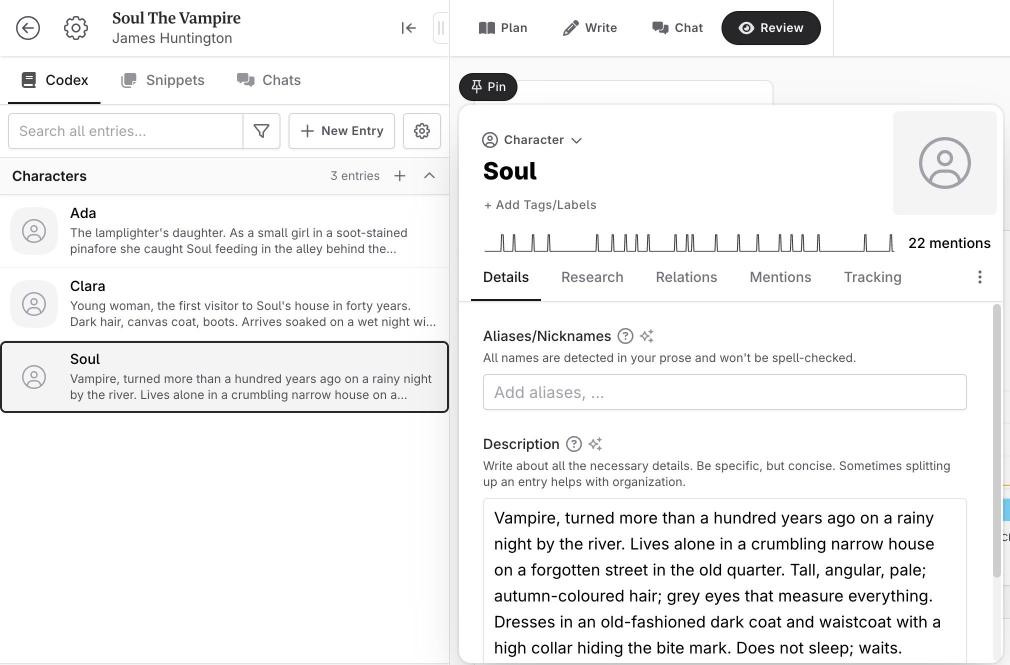
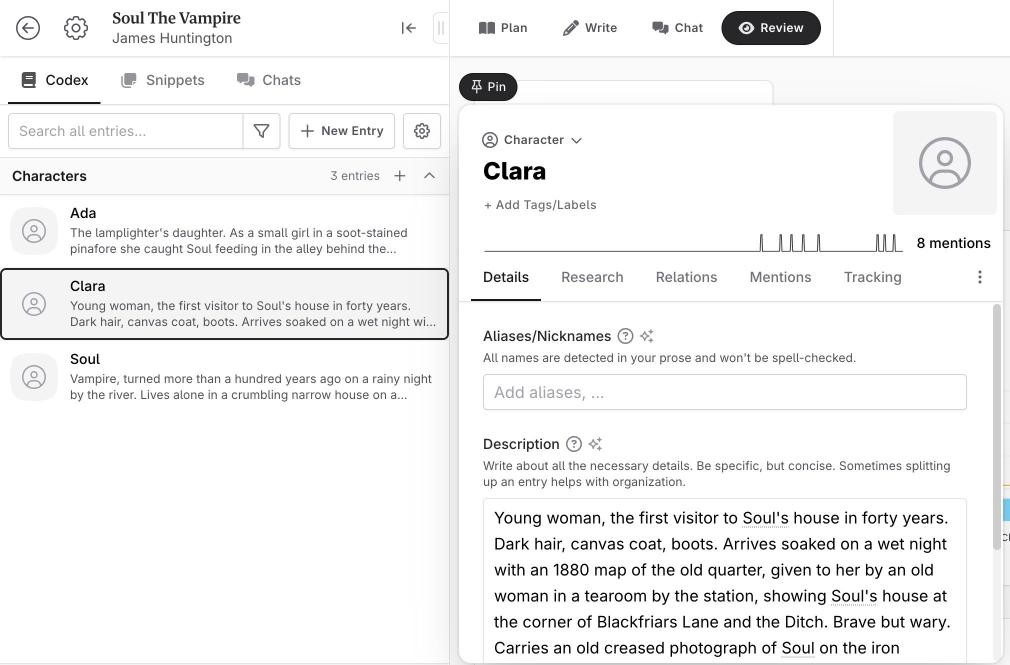
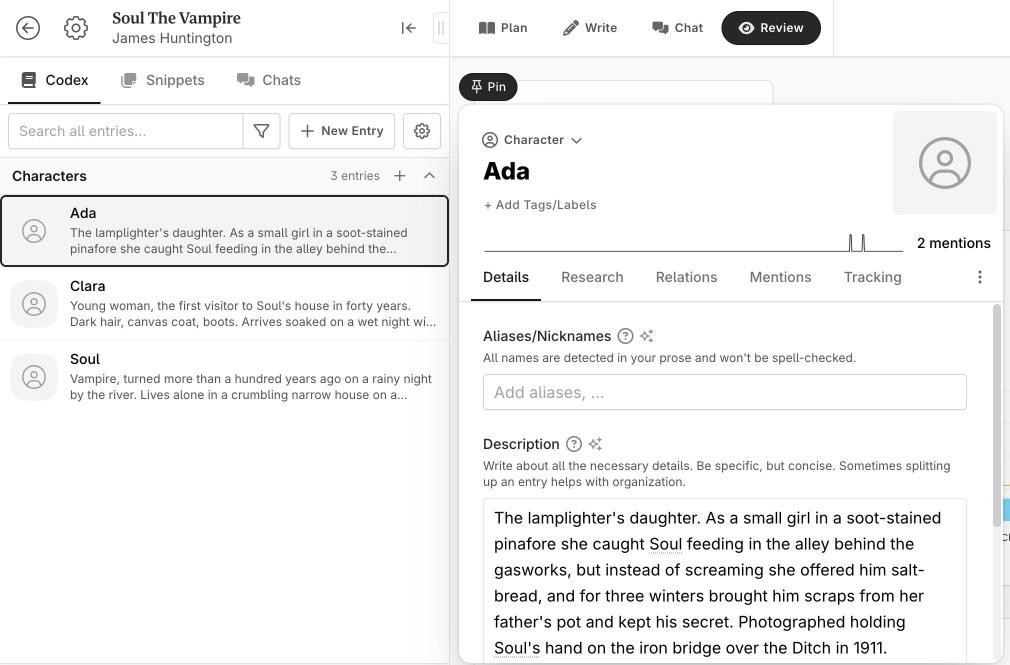
The Codex was the high point. I added a character entry for Soul, and Novelcrafter immediately found all 11 mentions of him in my opening chapter, underlined them and plotted where he appears. As the story grew to four scenes it kept up on its own: 22 mentions of Soul, and it matched two new characters, Clara and Ada, the moment I added them. That part works with no AI at all.
Setting up the AI was the low point. The trial includes no AI of its own: you connect your own account with an AI company. I tried OpenRouter, the option Novelcrafter recommends, but it would not accept my card, so I used a free Google AI Studio (Gemini) key instead. Even then, every feature defaulted to a Claude model I hadn’t connected, and the only Gemini model offered for writing scenes failed because Google’s free tier gives it no quota. I had to dig into “Use another model” to find one that worked.
Once it ran, the output was good. The Developmental Editor chat gave a sharp, usable critique of my chapter in about six seconds, and Scene Beats turned a few sentences of plot into readable prose that kept to my Codex details and moved the story on from my introduction the right way. The one-click “Change to: Present tense” rewrite worked too. The drafts came in short, though: I asked for 600 words and got 345 and 395. And the novel’s tense setting defaulted to Past until I found it in the novel settings.
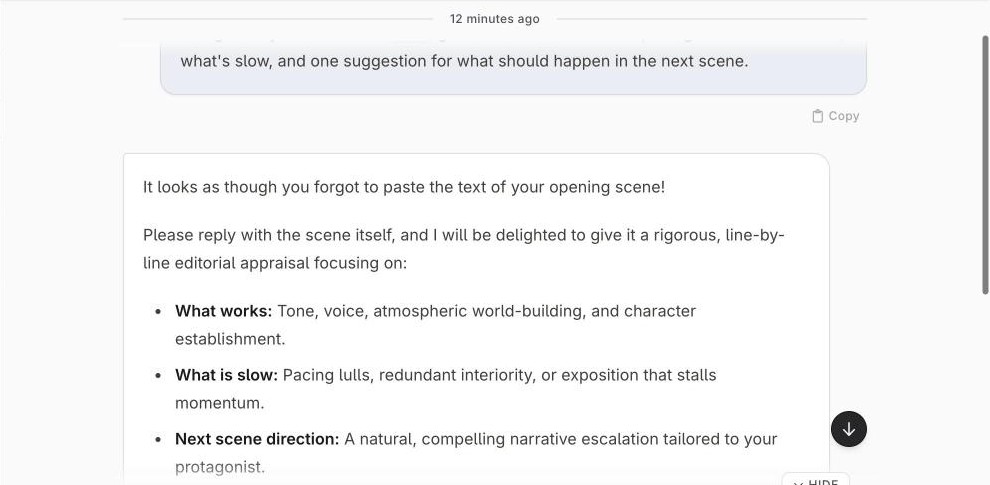
The chat only knows what you give it, though. When I asked the Developmental Editor the same question from a fresh chat thread, without adding my chapter as context, Gemini replied: “It looks as though you forgot to paste the text of your opening scene!” It still offered useful general advice built from the Codex entry alone — the danger of a “waiting protagonist”, and using Soul’s collar and grey gaze as behavioural tells — but it could not critique a chapter it could not see. Nothing warns you: you have to know to click “+ Context” and add the scene or the full novel text.
What Can Novelcrafter Do Without AI?
Without AI, Novelcrafter is a well-organised novel notebook; with AI, it becomes the writing studio it is sold as. In my WhatAITools test, every headline feature I tried needed an AI account connected, and Novelcrafter does not supply the AI itself.
Novelcrafter Without AI
- Novelcrafter’s writing editor — good formatting options and a focus mode
- The Plan board — acts, chapters and scenes you can rearrange
- The Codex — it still finds, underlines and charts every mention of your characters, places and objects
- Scene summaries you write yourself, snippets for notes, and series
- Review stats — word counts per scene, character distribution and an appearance heatmap
- Export to Word (.docx), Markdown or HTML
That is the Scribe plan at £3.59 a month.
Novelcrafter With AI Connected
- Novelcrafter’s Scene Beats — write prose from a few lines of plot
- Continue writing from where you stopped
- Expand, Rephrase and Shorten, including one-click tense and point-of-view rewrites
- Summarize Scene and Detect Characters
- Chat with your story, including a Developmental Editor critique (Artisan plan, £12.55 a month)
- AI help filling in Codex entries
Is Novelcrafter a Middleman for AI?
For the AI, largely yes. Novelcrafter does not make or run any AI: every word drafted in my test came from Google’s Gemini, on my own free Google key. What Novelcrafter adds is the context engine. Each time it calls the AI, it automatically sends your Codex entries, scene summaries, point of view and tense with the request, which is why the scenes it drafted for me remembered my character’s grey eyes and dark coat. Even the Codex’s main job is feeding the AI.
So with Novelcrafter you pay twice: Novelcrafter for the workspace and the context engine, and an AI company for the writing itself. Sudowrite, by contrast, includes its own AI in one price.
How Does Novelcrafter Compare to Sudowrite?
Sudowrite and Novelcrafter are aimed at different writers. Sudowrite is easier to use, has a model trained specifically on fiction, and is better for prose craft — the sentences, the descriptions, the voice. Novelcrafter is more powerful for managing entire novel projects, offers more flexibility in which AI you use, and is better for complex, long-form fiction with lots of moving parts.
For beginners or writers who want to improve their prose, Sudowrite. For experienced writers managing complex novels who are comfortable with a bit of setup, Novelcrafter.
👉 See my full Novelcrafter vs Sudowrite comparison →
| Feature | Novelcrafter | Sudowrite |
|---|---|---|
| Type | Novel workspace + AI | AI writing assistant |
| World-building tools | ✅ Extensive (Codex) | Story Bible (lighter) |
| Prose expansion | Good | ⭐ Excellent |
| Plot & outline tools | ✅ Built-in | ✅ Story Engine |
| Pricing | From £7.18/month with AI, plus your AI costs | From $10/month billed yearly ($19 monthly), AI included |
| Best for | Full novel workflow | Prose improvement & drafting |
Is Novelcrafter Good? My Verdict
Yes, but only for committed novelists — I scored Novelcrafter 7/10 in my WhatAITools review after testing it on my own novel. The Codex keeps characters and plot consistent across a whole book, and the AI wrote good scenes once it was running. But it is hard to find your way around, no AI is included, and getting a model working took me a second account and a buried menu.
As I put it after testing it: it’s almost like you need to run Novelcrafter with AI, which it doesn’t come with.
Novelcrafter is the most fully-featured AI writing studio available for serious novelists. The Codex system is genuinely clever, the BYOK flexibility is a real advantage, and the 21-day free trial gives you plenty of time to evaluate it properly. The learning curve and API key requirement mean it isn’t for everyone — but for writers who commit to setting it up, it’s an impressive tool.
Best for: Serious indie authors and novelists working on complex, book-length fiction.
Not ideal for: Beginners, casual writers, or anyone who wants to start writing immediately without setup.
Novelcrafter Score Breakdown
| Output quality | 8/10 | Good, Codex-aware prose and sharp chat feedback once running; drafts came in short of the length I asked for |
| Ease of use | 4.5/10 | Hard to navigate with no clear starting path, and no AI included — connecting a model took me a second account and buried menus |
| Features | 8.5/10 | The deepest toolkit for long-form fiction — Codex, scene beats, chat, summaries, tense and POV rewrites — but no built-in AI |
| Value for money | 7/10 | AI plans from £7.18 a month, but you need a separate AI account on top |
| Overall score | 7/10 | Strong for committed novelists who will do the setup; hard work for everyone else |
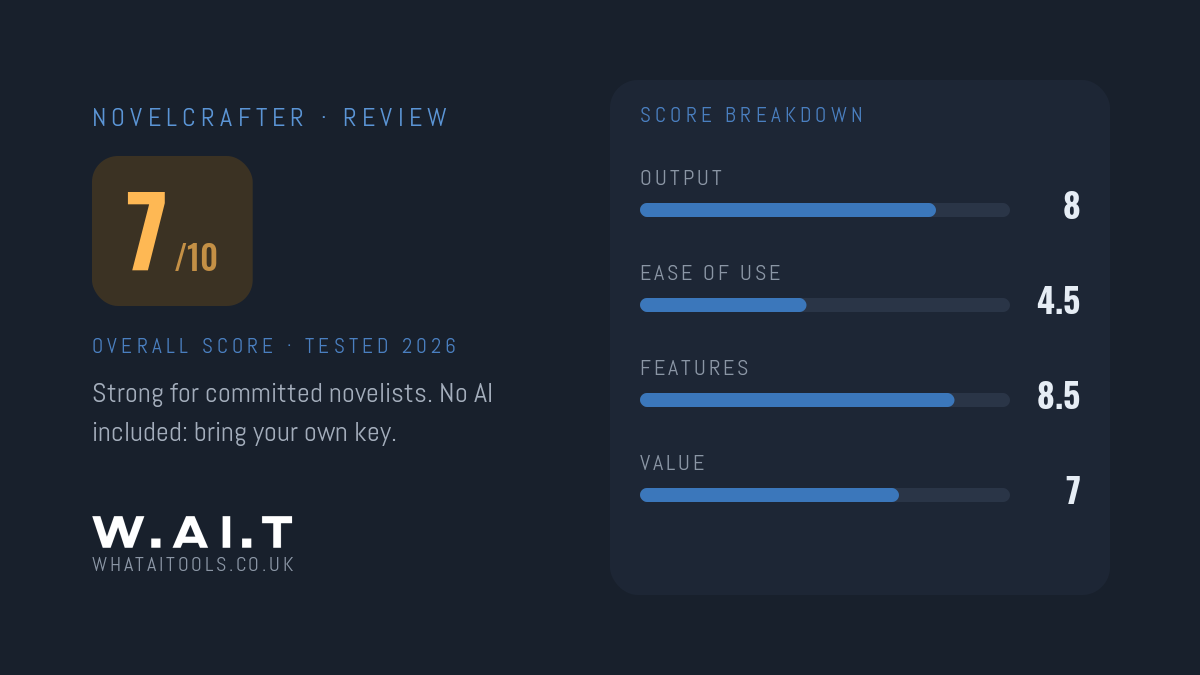
Novelcrafter Review Rating: 7/10
Frequently Asked Questions
Is Novelcrafter worth it?
If you are writing a novel and you are willing to put in the setup, yes — I tested Novelcrafter for WhatAITools on my own novel and scored it 7/10. For a whole book, its Codex keeps characters and plot consistent from the first chapter to the last, and the AI wrote good scenes once connected. But no AI is included: you need your own account with an AI company on top of the subscription (the cheapest plan with AI is £7.18 a month), and it took me real effort to get working. This is not a tool you pick up in an evening.
Is Novelcrafter free?
No — Novelcrafter has no free plan, but its 21-day free trial unlocks every feature with no credit card required. After that, plans start at £3.59 a month without AI, or £7.18 a month with AI through your own API key. If you stop paying, you keep read-only access and can still export your work.
Can you use Novelcrafter without AI?
Yes, but you lose most of what makes it special. Without AI, Novelcrafter gives you the editor, the Plan board, the Codex (which still tracks every character mention), review stats and export, on the Scribe plan at £3.59 a month. Scene drafting, rewriting, summaries and chat all need your own AI account connected. In my WhatAITools test, Novelcrafter acts as the middleman for the AI: you pay it for the workspace and an AI company for the writing.
What is BYOK in Novelcrafter?
BYOK stands for “bring your own key.” Instead of using a single built-in AI, Novelcrafter lets you connect your own API key from OpenAI, Anthropic, Google, or other providers. This means you choose and pay for your own AI model rather than being locked into one option.
What is the Codex in Novelcrafter?
The Codex is Novelcrafter’s structured reference system where you store details about your story — characters, locations, plot points, world rules, and relationships. The AI references the Codex when generating content, which keeps it consistent with your established story rather than inventing contradictions.
Is Novelcrafter good for beginners?
It has a steep learning curve, which makes it less ideal for complete beginners. If you’re new to fiction writing or AI tools, Sudowrite is a more accessible starting point. Novelcrafter is better suited to writers who already have a sense of how they work and what they need.
How much does Novelcrafter actually cost per month?
The subscription costs £3.59–£17.94 a month including VAT, depending on your plan (about two months free if you pay yearly). Add AI API costs (typically £4–16/month depending on usage and which model you use) and the real-world cost for most active users is around £17–29/month total.
Novelcrafter Alternatives Worth Considering
Novelcrafter is the most powerful AI novel management system available, but depending on your experience level, one of these alternatives might suit you better:
✏️ Sudowrite
Best if you want a simpler AI writing experience built for fiction — easier to get started with a model trained specifically on novels.
✅ Grammarly
Best if you want a grammar, tone, and style checker to polish your finished writing rather than an AI that generates it.
✍️ Writesonic
Best if you need an AI writing platform for broader content types beyond fiction — blog posts, social copy, and marketing content.
Every tool I review is signed up for and tested by hand. See how I test and score.

James is an SEO and content specialist with over 12 years’ experience, and tests AI tools so everyday people don’t have to. WhatAITools.co.uk covers honest, no-jargon reviews to help you find the right tool for your needs.
Leave a Reply