⚠️ Affiliate Disclosure: This post is not an affiliate associated review. It may become one in the future and this disclosure will reflect that. This does not affect my reviews and I only recommend tools I genuinely believe in.
This Grammarly review covers the AI writing assistant that millions of people use to check grammar, spelling, and style. We tested the free and Premium plans to give you an honest verdict on whether it’s worth paying for.
Grammarly Review
Grammarly is the best-known writing assistant in the world — trusted by 30 million people, recommended by universities, and built into almost every platform imaginable. But is it actually worth paying for? This review covers what Grammarly does well, where it falls short, and whether the Pro upgrade is worth the money.
What is Grammarly?
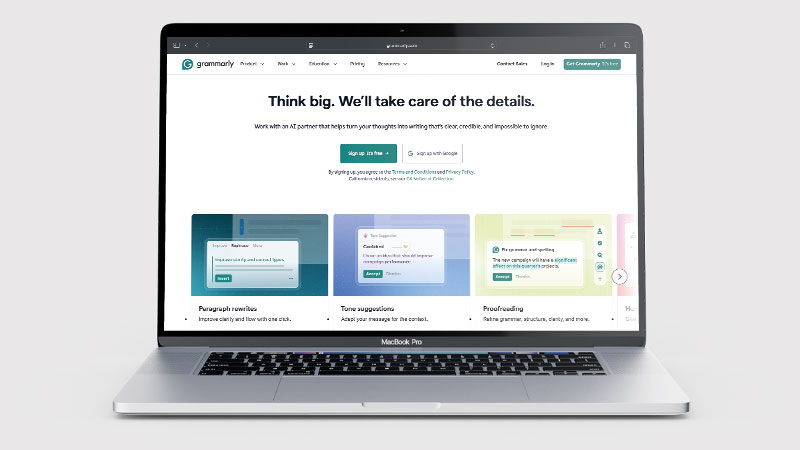
Grammarly is an AI-powered writing assistant that checks your writing for grammar, spelling, punctuation, clarity, tone, and style. It works as a browser extension, a desktop app, and a direct integration inside tools like Google Docs, Microsoft Word, Gmail, Slack, and hundreds of other platforms. Whatever you’re writing and wherever you’re writing it, Grammarly can be there.
Unlike AI writing tools that generate content for you, Grammarly is primarily an editing and quality-improvement tool. It works on your writing rather than replacing it — though the Pro plan now includes AI rewriting and generation features as well.
What Can You Do With Grammarly?
At its core, Grammarly catches mistakes. Grammar errors, spelling mistakes, punctuation issues — the free plan handles all of these. You install the browser extension, and it quietly highlights problems as you type in emails, docs, social posts, and forms.
The Pro plan goes further. It analyses clarity (identifying sentences that are too long or convoluted), checks tone (telling you if an email sounds passive-aggressive when you meant to be friendly), suggests vocabulary improvements, and detects plagiarism. The AI rewriting tools let you select any passage and ask Grammarly to improve it, simplify it, or change its tone — up to 2,000 AI prompts per month.
Grammarly Pricing
| Plan | Price | What’s included |
|---|---|---|
| Free | £0 | Grammar, spelling, punctuation checks; 100 AI prompts/month |
| Pro | £10/month (billed annually) — 7-day free trial | Everything in Free + clarity, tone, vocabulary, AI rewrites, plagiarism detection, 2,000 AI prompts/month |
| Enterprise | Custom pricing | Team admin, style guides, brand tone settings, SAML SSO |
The free plan is genuinely useful, but note it caps you at 100 AI prompts per month — grammar and spelling checks remain unlimited. Pro is worth considering if you write professional emails, reports, or client-facing content and want suggestions beyond basic errors. The annual commitment works out to £120/year with no monthly billing option. Pro comes with a 7-day free trial: £0 charged today, and Grammarly sends an email reminder 2 days before the trial ends so you won’t be surprised. The annual plan auto-renews unless you cancel before the renewal date.
Grammarly Review: Pros and Cons
Grammarly Pros
- Works everywhere — browser, Word, Gmail, Slack, and more
- Free plan is genuinely useful, not just a trial
- Tone detection is one of the best in class
- 4.7/5 on G2 from nearly 13,000 reviews
- Trusted by 30M+ users, including major enterprises
Grammarly Cons
- Pro requires annual commitment
- Can over-suggest on informal or creative writing
- AI rewrites don’t always match your voice
- Plagiarism check limited compared to specialist tools
- Some suggestions feel unnecessary or redundant
Who Is Grammarly For?
Grammarly is a strong fit for writers, students, professionals, and non-native English speakers who want real-time grammar, clarity, and tone suggestions as they write across any platform. If you write regularly — emails, reports, essays, blog posts — and want a reliable safety net for errors and unclear phrasing, Grammarly integrates seamlessly into your existing workflow. It is less suited to users who are looking for AI content generation rather than writing improvement.
Key Use Cases
Professional email and business writing. This is where Grammarly shines most. It catches the small mistakes that undermine credibility in professional communications — a misplaced apostrophe, an ambiguous sentence, a passive-aggressive tone you didn’t intend. The tone detection feature is particularly valuable for anyone writing to clients or stakeholders.
Students and academic writing. The free plan is popular with students for catching grammar mistakes in essays and assignments. The Pro plagiarism checker adds another layer of protection before submission, though dedicated plagiarism tools like Turnitin are more thorough.
Non-native English speakers. Grammarly is particularly useful if English isn’t your first language. It doesn’t just fix errors — it explains why something is wrong, which helps you learn and improve over time rather than just accepting corrections blindly.
Teams maintaining consistent quality. The Enterprise plan lets organisations define brand voice and style guidelines, and Grammarly applies those standards across everyone’s writing. For marketing teams or customer support teams where tone consistency matters, this is a practical solution.
What Are the Downsides of Grammarly?
It doesn’t understand context well enough. Grammarly sometimes flags correct sentences as errors, or suggests changes that are technically grammatical but stylistically wrong for the piece. Writers with a strong, distinctive voice often find themselves rejecting suggestions that would homogenise their writing.
The AI rewrites feel generic. The Pro rewriting features are decent but not exceptional. If you ask Grammarly to rewrite a passage, the result is usually cleaner and clearer — but it loses personality. For polished, voice-driven writing, you’ll still need to edit the AI’s output.
It’s an editing tool, not a writing tool. Grammarly won’t help you structure an argument, come up with ideas, or write a first draft. It makes existing writing better, but it starts from what you’ve already written. For content creation, you’d need a separate tool like ChatGPT or Jasper AI alongside it.
Privacy considerations. Because Grammarly reads everything you type, some users are uncomfortable using it with sensitive documents. Grammarly does have a detailed privacy policy and offers enterprise-grade security for business plans, but it’s worth being aware of what you’re sharing.
How Does It Compare to ChatGPT?
ChatGPT and Grammarly serve different purposes. ChatGPT is a generative AI — you give it a prompt and it writes content for you. Grammarly is an editing assistant — it works on what you’ve already written. They’re complementary rather than competing tools.
The more useful comparison is Grammarly Pro vs. the editing features in tools like Microsoft Editor or the built-in suggestions in Google Docs. Against those, Grammarly is considerably more thorough — particularly on tone, clarity, and style. The free plan alone outperforms what’s built into most word processors.
| Feature | Grammarly | ChatGPT |
|---|---|---|
| Grammar & spelling | ⭐ Best in class | Basic |
| Writing suggestions | ✅ Inline, real-time | Requires prompting |
| Plagiarism checker | ✅ Yes (Premium) | ❌ No |
| AI content generation | Limited | ⭐ Excellent |
| Browser extension | ✅ Yes | ❌ No |
| Pricing | Free + Premium from $12/mo | Free + $20/mo Plus |
| Best for | Editing & polishing text | Drafting & brainstorming |
Is Grammarly Good? Our Verdict
Yes — we scored Grammarly 8.5/10. It is still the default writing assistant, it follows you into every app you write in, and the free tier is one of the best free tools in any category. Pro needs an annual commitment, and it can over-suggest on informal or creative writing.
Grammarly is the gold standard for AI-assisted writing quality. The free plan is one of the best free tools in any category — most people should install it just for the grammar and spell-checking alone. Pro is worth the money if you write a lot of professional or client-facing content and want the clarity, tone, and rewriting features.
Grammarly Review Rating: 8.5/10
Best for: Anyone who writes professionally — especially emails, reports, or client-facing documents.
Not ideal for: Writers looking for content generation or creative AI tools. Grammarly edits; it doesn’t create.
Grammarly Score Breakdown
| Output quality | 9/10 | Catches things other checkers miss, across tone as well as grammar |
| Ease of use | 9.5/10 | It follows you into every app you write in |
| Features | 8.5/10 | Grammar, tone, rewrites and plagiarism; the plagiarism check is basic |
| Value for money | 8/10 | Pro needs an annual commitment, and it can over-suggest on creative writing |
| Overall score | 8.5/10 | Still the default writing assistant, and the free tier is genuinely useful |
Frequently Asked Questions
Is Grammarly legit?
Yes. Grammarly is one of the longest-established writing tools available, used by millions, with a genuinely free tier that needs no card. If you are asking because of privacy, note that it processes your text on its servers, which is worth checking against your employer policy.
Is Grammarly free?
Yes — Grammarly has a free plan that includes unlimited grammar, spelling, and punctuation checks. It’s not a trial; the free plan works indefinitely. The paid Pro plan (around £10/month on an annual plan) adds clarity suggestions, tone detection, AI rewrites, and plagiarism detection.
Is Grammarly safe to use?
Grammarly reads the text you write to check it, which means it processes your content on its servers. For general professional writing this is low-risk. For highly sensitive legal, financial, or confidential content, you should review Grammarly’s privacy policy and consider whether you’re comfortable with that arrangement.
Does Grammarly work in Microsoft Word?
Yes — Grammarly has a Microsoft Word add-in for both Windows and Mac. It also works in Google Docs, Gmail, Outlook, Slack, and most other major writing platforms via a browser extension or native integration.
Is Grammarly Pro worth it?
It depends on what you write. If you send a lot of professional emails or write reports and presentations, the tone and clarity features are genuinely useful. If you only need basic error-checking, the free plan is probably enough. The annual cost of around £120/year is reasonable if you’re using it daily for professional work.
Can Grammarly write content for me?
Not in the way a tool like ChatGPT or Jasper can. Grammarly Pro includes AI rewriting tools that let you improve, simplify, or change the tone of existing text, and it can generate short suggestions — but it’s designed as an editing assistant, not a content generator. For full content creation, you’d want a dedicated AI writing tool alongside it.
Does Grammarly Pro have a free trial?
Yes. Grammarly Pro includes a 7-day free trial with no payment taken upfront. You’ll receive an email reminder 2 days before the trial ends. If you don’t cancel, the annual plan (£120/year) activates automatically.
Can I cancel Grammarly Pro at any time?
Yes, you can cancel from your account settings at any time. The annual plan auto-renews each year — cancel before your renewal date to avoid being charged for another year. Unused AI prompts do not roll over or get refunded.
Grammarly Alternatives Worth Considering
Grammarly is the best editing and proofreading tool available, but if you need something that generates content rather than just improving it, one of these might be a better fit:
✍️ Writesonic
Best if you want an AI that generates full articles and marketing content for you, rather than editing what you’ve already written.
📣 Copy.ai
Best if you need an AI to create short-form marketing copy — ads, email campaigns, and social posts — from scratch.
🤖 ChatGPT
Best if you want a general-purpose AI assistant that can edit, rewrite, and improve your text alongside hundreds of other tasks.
Every tool we review is signed up for and tested by hand. See how we test and score.

James is an SEO and content specialist with over 12 years’ experience, and tests AI tools so everyday people don’t have to. WhatAITools.co.uk covers honest, no-jargon reviews to help you find the right tool for your needs.
Leave a Reply