⚠️ Affiliate Disclosure: This post is not an affiliate associated review. It may become one in the future and this disclosure will reflect that. This does not affect my reviews and I only recommend tools I genuinely believe in.
Murf AI Review
This Murf AI review examines the text-to-speech platform that promises studio-quality voiceovers without a microphone, recording setup, or voice actor. We tested it across e-learning, marketing video, and podcast production use cases to see how the voice quality holds up and whether the pricing makes sense. Here’s our honest verdict.
Murf AI is one of the most polished text-to-speech platforms available, with over 120 voices across 20 languages that have crossed the threshold where they are genuinely usable in professional productions. It is not just a voice generator — Murf includes a video editor that lets you layer voiceover directly onto footage, sync timing, and export a finished video. That combination of voice quality and built-in editing tools makes it a practical replacement for expensive voice talent on many project types.
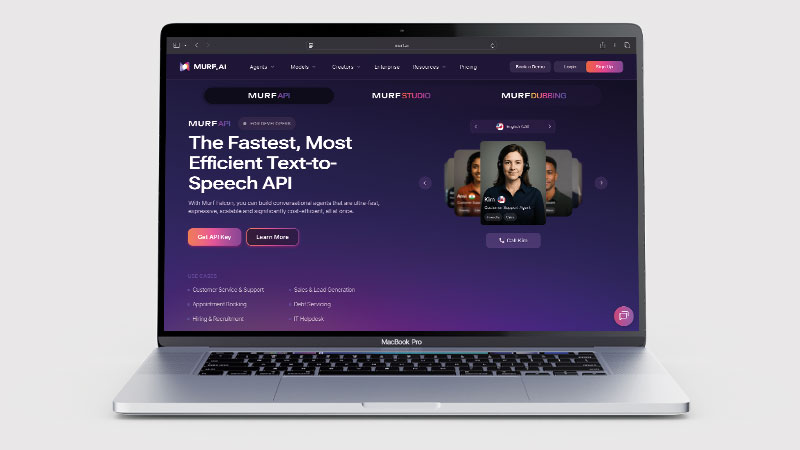
The platform targets e-learning creators, marketers, and media teams who need high volumes of voiceover content without the cost or logistics of booking voice actors. A free plan exists for evaluation, and paid plans unlock commercial usage, higher-quality voices, and API access for those building voiceover into products or workflows.
What is Murf AI?
Murf AI is a cloud-based AI voice generator that converts text to speech using deep learning models trained on professional voice recordings. Unlike the robotic-sounding text-to-speech of five years ago, Murf’s voices have natural cadence, realistic intonation, and appropriate pausing — meaning they work in production contexts where previous-generation TTS would have been immediately obvious.
The platform’s 120+ voices span multiple accents and languages (US English, UK English, Australian, Indian, French, German, Spanish, and more), and each voice can be customised for pitch, speed, and emphasis. Murf also offers a Voice Changer that can clone a recorded voice for use in AI-generated speech, and an API for developers integrating TTS into applications.
What Can You Do With Murf AI?
Murf AI is aimed at people producing narration rather than experimenting with voices. Here is what it covers.
- Generate professional narration — Murf AI produces voiceover good enough for published e-learning and marketing video.
- Choose from 120+ voices — Murf AI covers over 20 languages with natural intonation.
- Direct the performance — Murf AI gives you pitch, speed and emphasis controls rather than take-it-or-leave-it output.
- Sync voice to video — Murf AI includes a built-in video editor so narration lines up with the footage.
- Preview everything free — Murf AI lets you audition the whole voice library before paying.
- Clone a voice on Business — Murf AI’s Voice Changer is locked to the Business plan, which works out dearer than ElevenLabs for cloning.
Murf AI Pricing
| Plan | Price | Voice access | Minutes/month | Best For |
|---|---|---|---|---|
| Free | $0/mo | All voices (no download) | 10 mins | Evaluating the platform |
| Creator | $19/mo (annual) | 120+ voices, commercial rights | 2 hrs/mo included | Freelancers and solo creators |
| Business | $66/mo (annual) | All voices, Voice Changer, API | 8 hrs/mo included | Teams and higher volume |
| Enterprise | Custom | Custom voices, SLAs | Custom | Large organisations |
The free plan allows you to generate and preview voiceover but not download it — enough to evaluate voice quality before committing. Creator at $19/month (annual) gives commercial usage rights and 2 hours of generation per month, which covers a reasonable volume of content. Business adds Voice Changer, API access, and significantly more generation capacity. Minutes beyond the included allowance can be purchased as add-ons.
Murf AI Review: Pros and Cons
Murf AI Pros
- Voice quality is genuinely professional — usable in published e-learning and marketing content
- 120+ voices across 20+ languages with natural intonation
- Built-in video editor for direct voiceover synchronisation
- Free plan lets you preview all voices before paying
- Pitch, speed, and emphasis controls for fine-grained voice customisation
- Commercial usage rights included from Creator plan
Murf AI Cons
- Voice Changer (cloning) only on Business plan — more expensive than ElevenLabs for cloning
- Minute limits can be reached quickly on high-volume projects
- Some voices are noticeably better than others — quality varies within the library
- API only on Business and above, limiting developer use on Creator
- Video editor is functional but not a replacement for a dedicated editing tool
Who Is Murf AI For?
Murf AI is a good fit for e-learning developers, content creators, corporate trainers, and marketers who need studio-quality voiceovers without a microphone, voice talent budget, or recording setup. If you are producing explainer videos, course content, or product demos regularly, Murf gives you consistent, professional-sounding narration on demand. It is less suited to projects where a human voice with specific emotional nuance is essential, such as documentary narration or character-driven audio.
Key Use Cases
E-learning and online courses. Course creators use Murf to narrate slides, modules, and explainer videos without recording themselves. Consistent voice across all modules, no retakes for mistakes, and the ability to update narration by editing text makes it significantly more efficient than recording human voiceover. The integrated video editor means you can sync narration to slides without leaving the platform.
Marketing and product videos. Marketing teams use Murf to produce explainer videos, product demos, and ad voiceovers at scale. The ability to produce dozens of variations with different voices or in different languages makes localisation practical without a full voice casting and recording operation.
Accessibility content. Publishers, app developers, and content teams use Murf to add audio versions of written content for visually impaired audiences, improving accessibility without the cost of professional audio recording for every piece.
Murf AI Voice Agents: The Other Half of the Platform
Since we first tested Murf, the company has repositioned. It now describes itself as a “Leading AI Voice & Conversational Agent Platform”, and voice agents — not voiceovers — lead its homepage. If you have used Murf before and come back expecting a text-to-speech studio, the site will look unfamiliar.
In practice Murf is now two products aimed at two very different buyers:
| Murf Studio | Murf Voice Agents | |
|---|---|---|
| What it does | Text-to-speech voiceovers, voice cloning, dubbing | AI agents that answer and make phone calls |
| Who it’s for | Creators, marketers, e-learning teams | Sales, support and contact centre teams |
| How you buy it | Self-serve, free tier, public pricing | Sales-led — “Book a Demo”, no public pricing |
| Covered in this review | Yes — tested hands-on | No — see the note below |
What the voice agents actually do
Murf’s agents handle inbound and outbound calls, and it publishes a purpose-built page for each use case: AI receptionist, AI recruiter, AI call centre, AI cold calling, AI sales agent, AI SDR, consumer lending and AI customer service, with further variants for healthcare, retail, restaurants and real estate.
The platform connects to the tools those teams already run — Salesforce, HubSpot, Zoho and Pipedrive for CRM; Twilio, Vonage or an existing SIP trunk for telephony; Google Calendar, Outlook and Calendly for booking; and Zapier, Make or n8n for follow-up automation. You can also bring your own language model, with OpenAI, Anthropic and Gemini all supported.
Murf’s own headline claims are sub-800ms response latency, 35+ languages, 200+ voices, a 40% reduction in cost-to-serve and a 30% lift in CSAT. It lists SOC 2, ISO 27001, GDPR and HIPAA compliance. These are the vendor’s figures, not ours — we have not verified them.
Why we haven’t scored it
Everything in this review — the score, the pros and cons, the verdict — refers to Murf Studio, the voiceover product. We signed up, generated real voiceovers and tested cloning. We have not deployed a production voice agent, and we won’t pretend otherwise.
There’s a practical reason as well as an honest one. The agent product has no public pricing and no free tier: every route in leads to “Book a Demo” or “Contact Sales”. That puts it outside what most readers of this site can simply try, and it makes a fair hands-on test dependent on a sales process rather than a sign-up form.
The short version: if you want voiceovers for videos, courses or podcasts, this review applies and Murf Studio is self-serve. If you want an AI agent answering your phone, you’re buying a different product on enterprise terms, and you should expect a sales conversation before you see a price. We’ll review that side separately once we can test it properly.
What Are the Downsides of Murf AI?
Murf’s voices are excellent but not indistinguishable from human recording in every context. For high-stakes commercial productions — national advertising, premium brand content, documentary narration — a professional voice actor still produces noticeably better results. Murf is best positioned for functional voiceover (courses, demos, tutorials) where efficiency and cost matter more than ultimate audio quality.
The minute-based usage model can make costs unpredictable if your volume varies month to month. High-volume users — producing large course libraries or regular video content — should calculate their monthly minute requirements carefully before choosing a plan. Add-on minutes are available but add up quickly.
How Does Murf AI Compare to ElevenLabs?
ElevenLabs is the other major player in AI voice generation, and the comparison is close. ElevenLabs has a slight edge on voice naturalness at the top end, and its voice cloning capability is available from a lower price point. Murf AI has a stronger built-in video editing workflow and a larger pre-built voice library without needing to create custom clones. For e-learning and video production where you want to pick a voice from a library and add it to footage in one platform, Murf is often the better fit. For voice cloning and API-first integrations, ElevenLabs has the edge. See our ElevenLabs review for the full comparison.
| Feature | Murf AI | ElevenLabs |
|---|---|---|
| Free plan | ✓ Preview only | ✓ 10k characters/mo |
| Starting price | $19/mo (annual) | $5/mo |
| Voice library | 120+ voices | 3,000+ voices |
| Voice cloning | Business plan+ | Starter plan+ |
| Video editor | ✓ Built-in | ✗ |
| Best for | E-learning & video production | Cloning & API integrations |
Is Murf AI Good? Our Verdict
Yes — we scored Murf AI 8.5/10. Voice quality is good enough for published e-learning and marketing video, and the pitch, speed and emphasis controls let you direct the performance rather than accept what you are given. Voice cloning is locked to the Business plan, which works out dearer than ElevenLabs.
Murf AI is one of the most production-ready AI voice platforms available. The voice quality crosses the bar for professional use in e-learning, marketing, and product video contexts, and the built-in video editor makes it a genuinely complete voiceover production tool rather than just a voice generator. At $19/month for Creator, it is competitively priced for solo creators who need commercial-quality voiceover without the cost of a recording setup or voice actor.
For voice cloning specifically, ElevenLabs offers more at a lower entry price. But for the typical e-learning or video creator who wants to pick a voice, write a script, and export a finished video in one platform, Murf is hard to beat.
Murf AI Review Rating: 8.5/10
Every tool we review is signed up for and tested by hand. See how we test and score.
Best for: E-learning creators, marketers, and video producers who need professional voiceover without the cost or logistics of recording human narration.
Not ideal for: High-stakes commercial productions where maximum voice quality matters, or developers who need voice cloning from a lower price point.
Murf AI Score Breakdown
| Output quality | 8.5/10 | Natural delivery across a large library, though quality varies between voices |
| Ease of use | 9/10 | The studio makes timing and emphasis genuinely easy to adjust |
| Features | 8/10 | Strong editing controls; voice cloning is locked to the Business plan |
| Value for money | 8/10 | Fair for standard narration, dearer than ElevenLabs once cloning matters |
| Overall score | 8.5/10 | The best AI voice tool for people who want to direct the performance |
Frequently Asked Questions
Is Murf AI worth it?
For narration work, yes. Murf AI gives you 120+ voices with real control over pitch, speed and emphasis, and a free plan to audition everything first. If voice cloning is the reason you are looking, ElevenLabs is cheaper — Murf locks cloning to Business.
Is Murf AI free?
Yes — Murf has a free plan that lets you preview all 120+ voices with up to 10 minutes of generation. Downloads require a paid plan. The free tier is designed for evaluation rather than production use, but it gives you a genuinely accurate sense of how the voices sound before committing to a subscription.
Can Murf AI clone your voice?
Yes, via the Voice Changer feature — but only on the Business plan ($66/mo annual). You record a sample, Murf trains a model on it, and you can then generate new speech in your cloned voice. The quality is good for corrections and consistent narration, though ElevenLabs offers voice cloning from a lower price tier if that is your primary requirement.
Does Murf AI include commercial usage rights?
Yes — from the Creator plan ($19/mo annual) upwards, Murf includes commercial usage rights for the voiceover you generate. You can use the audio in client projects, sold courses, advertising, and commercial videos. Check the specific plan terms for any project type with specific licensing requirements.
How many languages does Murf AI support?
Murf supports 20+ languages including US English, UK English, Australian English, Indian English, Spanish, French, German, Italian, Portuguese, Hindi, and more. The quality varies by language — English voices are the strongest — but the multilingual library makes it practical for localised content production without separate voice casting per region.
Alternatives to Murf AI
ElevenLabs — The closest competitor, with a slight edge on voice naturalness at the top end and voice cloning from a lower price point. See our ElevenLabs review for a detailed comparison.
Play.ht — Another strong AI voice platform with a similar voice library and pricing structure. Worth comparing directly if Murf’s specific voice selection does not include the voice type you need.
Speechify — Primarily a text-to-speech reading tool rather than a production voiceover platform. Better for personal productivity (listening to articles, documents) than professional content production.
More from WhatAITools: Agent Opus review, Suno review and OpusClip review.

James is an SEO and content specialist with over 12 years’ experience, and tests AI tools so everyday people don’t have to. WhatAITools.co.uk covers honest, no-jargon reviews to help you find the right tool for your needs.
Leave a Reply