⚠️ Affiliate Disclosure: This post is not an affiliate associated review. It may become one in the future and this disclosure will reflect that. This does not affect my reviews and I only recommend tools I genuinely believe in.
Canva Magic Studio Review
This Canva Magic Studio review covers the AI features built into the design tool almost everyone already has an account for — Magic Write, Dream Lab image generation, Magic Eraser, Magic Expand and the conversational Canva AI. I look at how the credit system works, what free users actually get, and whether the AI is good enough to matter.
Canva did not set out to be an AI company. It was already the default design tool for people who are not designers, and Magic Studio is what happened when it wrapped AI around that.
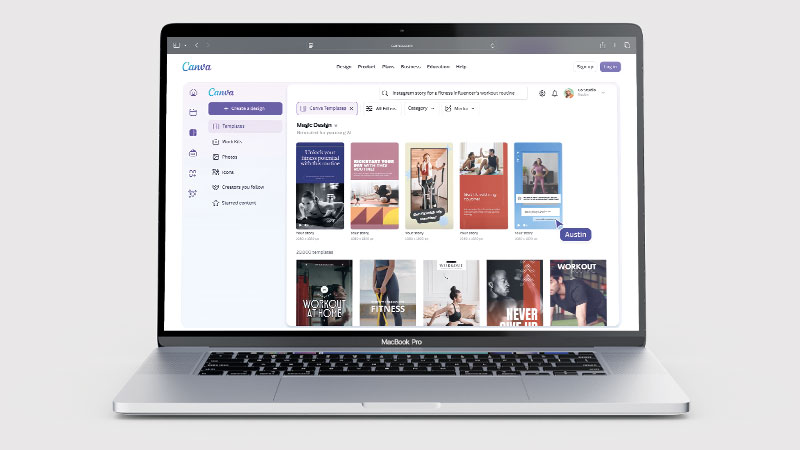
That context matters, because Magic Studio is not trying to beat Midjourney on image quality. It is trying to remove the moment where a small business owner gives up on a design because they cannot get the background off a product photo.
What is Canva Magic Studio?
Magic Studio is an umbrella name for Canva’s AI features rather than a separate product. It spans the main editor plus Sheets, Code, Video and the Affinity suite Canva acquired and made free in 2026.
The headline features are Magic Write for text, Dream Lab for image generation, Magic Eraser and Magic Expand for editing, and Canva AI — a conversational interface where you describe what you want and it builds editable design objects rather than flat images.
What Can You Do With Canva Magic Studio?
Canva Magic Studio is a set of AI tools bolted onto a design app most people already use. Here is what it adds.
- Remove and replace objects — Canva Magic Studio’s Magic Eraser takes things out of a photo cleanly, which is the tool most people end up using daily.
- Extend an image beyond its edges — Magic Expand fills in what was outside the frame, useful when a photo is the wrong shape for a format.
- Generate images from text — Canva Magic Studio makes pictures from a description, though quality trails Midjourney.
- Write and rewrite copy — Magic Write drafts and adjusts text inside the design rather than in a separate tool.
- Turn a document into a deck — Canva Magic Studio converts written content into a designed presentation.
- Edit video with AI — Canva Magic Studio trims, captions and reformats video for different platforms.
- Watch your credits — Canva Magic Studio meters AI use, credits do not roll over, and image generation burns them fastest.
Canva Magic Studio Pricing
| Plan | Price | AI credits | Notes |
|---|---|---|---|
| Free | $0 | Limited monthly allowance | Enough to try the features, not to rely on them |
| Pro | Around $15–18/mo | 500/month | Shared across all Magic Studio features, no rollover |
| Teams | Around $20–25/user/mo | Higher allowance | Brand controls and collaboration |
| AI Pass add-on | $100/person/mo | Roughly 40× Pro allowance | More credits only — unlocks no new tools |
Canva changed pricing during 2026 and independent trackers disagree on the exact figures, so treat the numbers above as a guide and check the current page before subscribing.
The important mechanic is credits. Every AI action costs from a shared monthly pool, and unused credits do not roll over. Image generation burns through them fastest.
The $100 AI Pass is aimed at heavy users and buys volume, not capability. If you are hitting the Pro ceiling regularly, do the arithmetic against a dedicated image tool before adding it.
Canva Magic Studio Review: Pros and Cons
Canva Magic Studio Pros
- AI sits inside a tool you already know — no new workflow to learn
- Magic Eraser and Magic Expand are genuinely time-saving on real jobs
- Canva AI produces editable objects, not flat images you cannot change
- Enormous template library gives the AI a sensible starting point
- Brand kit keeps AI output on-brand, which most generators cannot do
- Free plan lets you try every feature before paying
Canva Magic Studio Cons
- Credit system is confusing and burns fast on image generation
- Credits do not roll over month to month
- Image quality trails dedicated generators like Midjourney
- Pricing rose twice between 2025 and 2026
- The $100 AI Pass is poor value unless you are a very heavy user
- Best AI features are gated behind Pro
Who Is Canva Magic Studio For?
Magic Studio suits small business owners, marketers and social media managers who need decent visuals quickly and do not want to learn a design tool, let alone a prompt-based image generator.
It suits teams who need output to stay on brand, because the brand kit constrains what the AI produces in a way standalone generators cannot.
It suits less well if image quality is the point. If you are producing hero artwork or illustration where the image is the deliverable, a dedicated generator will beat it.
Key Use Cases
- Social media graphics — on-brand posts at volume without a designer
- Product photo cleanup — Magic Eraser removing backgrounds and objects
- Presentations — generating a deck structure and visuals from a prompt
- Ad creative variations — quickly testing several versions of the same idea
- Resizing campaigns — Magic Expand adapting one design to many formats
What Are the Downsides of Canva Magic Studio?
The credit system is the main frustration. It is not always obvious what an action will cost, and running out mid-project is a poor experience. Because credits are shared across every AI feature, heavy image use starves the text tools.
Image generation is competent rather than exceptional. For marketing graphics it is fine; for anything where the image carries the work, it is not the best tool available.
Pricing has moved twice recently and sources disagree on current figures, which makes it harder to plan than it should be.
How Does Canva Magic Studio Compare to Midjourney?
| Canva Magic Studio | Midjourney | |
|---|---|---|
| Image quality | Good | Excellent |
| Ease for non-designers | Excellent | Steep learning curve |
| Editable output | Yes — real design objects | No — flat images |
| Brand consistency | Brand kit enforces it | Manual |
| Free tier | Yes | No |
| Best for | Finished marketing assets | Standalone artwork |
They solve different problems. Midjourney makes a better image; Canva makes a better finished asset. See my Midjourney review.
Is Canva Magic Studio Good? My Verdict
Yes — I scored Canva Magic Studio 8.5/10 in my WhatAITools review. Magic Eraser and Magic Expand are genuinely time-saving, and the AI sits inside a tool you already know so there is no new workflow to learn. Image generation trails Midjourney, and the credit system burns fast without rolling over.
Canva Magic Studio is the most practical AI design tool for people who are not designers, and that is a bigger achievement than beating anyone on raw image quality. The AI is embedded where the work already happens.
Magic Eraser and Magic Expand are the features you will actually use every week. Dream Lab and Canva AI are impressive demos that occasionally save real time. The brand kit constraining AI output is quietly the most valuable part for any business that cares about consistency.
The credit system lets it down. Shared, non-rolling credits across every AI feature create anxiety about using the thing you are paying for, and the $100 AI Pass is a strange answer to that problem. Buy Pro, treat the credits as a monthly allowance, and use a dedicated tool when the image itself is the deliverable.
Canva Magic Studio Review Rating: 8.5/10
Every tool I review is signed up for and tested by hand. See how I test and score.
Best for: Small businesses, marketers and social media managers who need on-brand visuals quickly without design skills.
Not ideal for: Anyone who needs best-in-class image generation, or who dislikes credit-metered AI.
Canva Magic Studio Score Breakdown
| Output quality | 8/10 | Magic Eraser and Magic Expand are excellent; image generation trails Midjourney |
| Ease of use | 9.5/10 | The AI sits inside a tool you already know, so there is nothing new to learn |
| Features | 9/10 | A very wide toolkit covering design, video, writing and image editing |
| Value for money | 7.5/10 | Credits burn fast, do not roll over, and pricing rose twice in two years |
| Overall score | 8.5/10 | The most approachable AI design tool, held back by its credit system |
Frequently Asked Questions
Is Canva Magic Studio legit?
Yes. Canva Magic Studio is Canva own AI toolset, not a third-party add-on, and it is included in the Canva account you may already have. The thing to watch is credits rather than trust: they burn quickly on image generation and do not roll over.
Is Canva Magic Studio free?
There is a free allowance of AI credits each month, enough to try every feature. Serious use needs Canva Pro, which includes 500 credits a month shared across all Magic Studio tools.
How do Canva AI credits work?
Every AI action draws from one monthly pool shared across all features. Credits reset monthly and do not roll over. Image generation uses them fastest.
Is the $100 AI Pass worth it?
Only for very heavy users. It multiplies your credit allowance but unlocks no new features. Compare the cost against a dedicated image generator before adding it.
Is Canva’s AI as good as Midjourney?
No, not on raw image quality. Canva’s advantage is that output is editable, stays on brand, and lands inside a finished design rather than as a standalone image.
Alternatives to Canva Magic Studio
Midjourney — Far better raw image quality if the image itself is the deliverable. See my Midjourney review.
AdCreative.ai — Purpose-built for ad creative and conversion testing rather than general design. See my AdCreative.ai review.
Gamma — A better answer if what you actually need is presentations rather than graphics. See my Gamma review.
More from WhatAITools: Midjourney review, Riverflow AI review and AdCreative.ai review.

James is an SEO and content specialist with over 12 years’ experience, and tests AI tools so everyday people don’t have to. WhatAITools.co.uk covers honest, no-jargon reviews to help you find the right tool for your needs.
Leave a Reply